Share:
Imagine: you are a model with 10,000 followers. Your annual income is $20,000. You plan to scale up, hire a manager, and invest in promotion. Suddenly, you receive a letter from OnlyFans: “Your account has been blocked. A copyright violation has been detected.”
It turns out that a subscriber filed a complaint about your collaboration video from six months ago. The moderators requested documents. You have a consent form, but your partner’s name is spelled incorrectly — it doesn’t match their passport. In this case, the platform deletes the content and issues a warning, and if the violation is repeated, it can permanently block the profile.
Stories like this happen because of mistakes in the consent form. In this article, we’ll explain what it is, how to work with it correctly, and how to protect your account.
What is a release form?
It is a legal document that confirms three important requirements:
- Consent. The person voluntarily participates in the filming. A verbal “okay” has no legal force. If the co-author changes their mind in six months, you have no protection.
- Age. They are 18 years of age or older, as confirmed by their passport. Even if the co-author looks 25, you can be sued for content involving a minor.
- Permission for monetization. They understand that the content will be sold and will not make any claims. Consent to filming does not imply automatic consent to monetization.
A release form is the only document that will help you in case of a conflict. OnlyFans moderators do not accept correspondence as evidence, so a form is essential.
There is also a legal basis for these requirements. In the US, there is a law, 18 U.S.C. §2257, which requires proof of age and consent from all participants in adult content. OnlyFans operates under US jurisdiction and builds its rules around this standard, so the requirements for forms and documents apply to all creators, regardless of country.
Misconceptions about release form that lead to bans
In 2025, OnlyFans moderators deleted 174,000 posts for violating site rules. One of the most common reasons was misconceptions about consent forms. Here are some common myths:
“If a person has an OnlyFans account, they don’t need a form.”
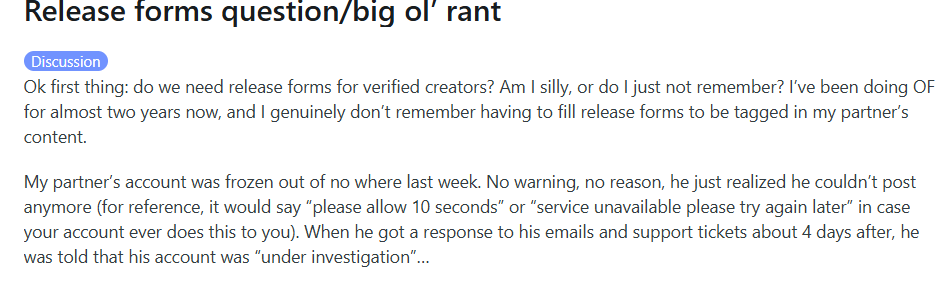
The model’s account was blocked because the partner did not fill out the consent form for collaboration
“You can use the co-author’s nickname instead of their full name.”
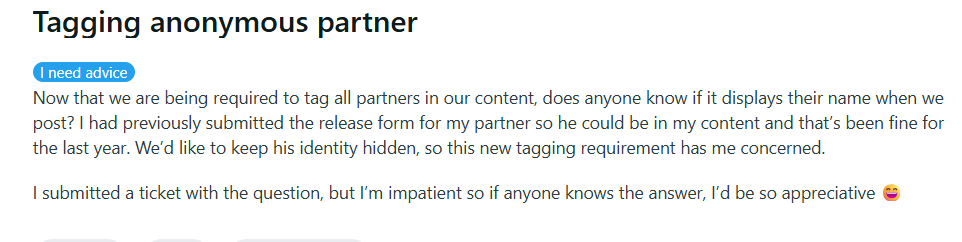
One of the most common reasons for refusing to accept the form is confusing the name and nickname
“If the face is not visible, you don’t need to fill it out.”
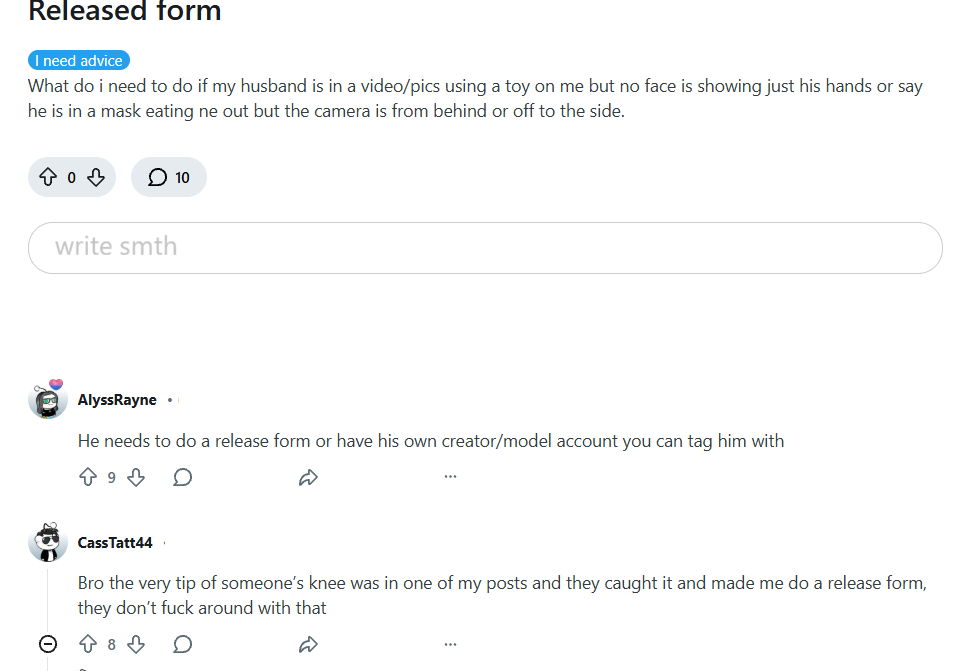
Personal experience confirms that even if only another person’s hands or feet are visible in the frame, they still have to sign the consent form
“This is too paranoid, no one checks.”
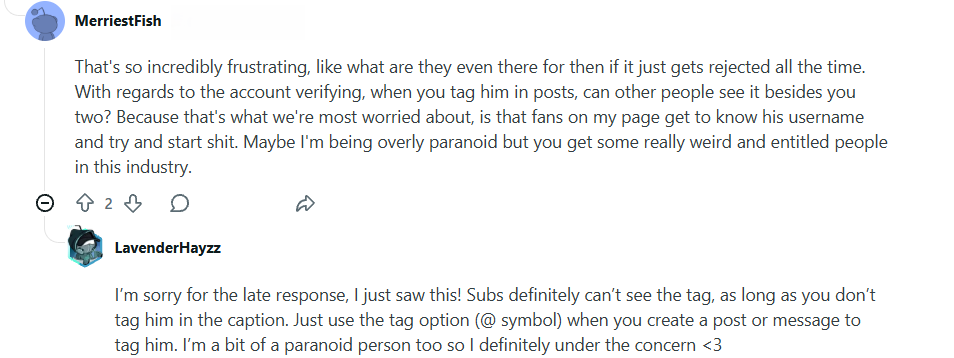
The author was afraid that subscribers would see the co-author’s real name.
“OnlyFans accepts both paper scans and electronic forms.”
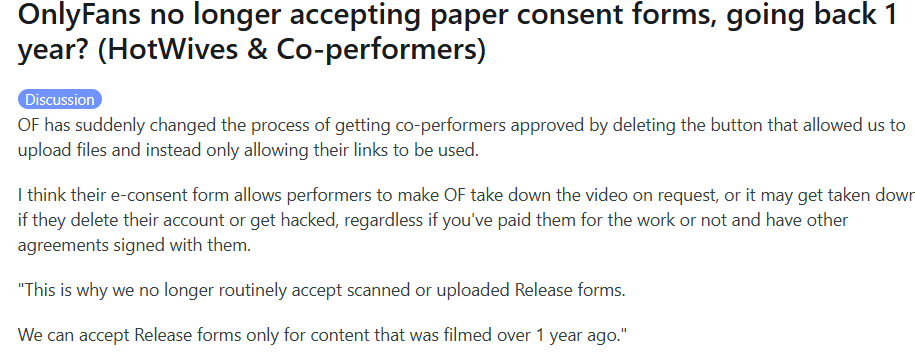
The platform’s current policy states that scans are only acceptable for content older than 1 year
Most often, such misconceptions can result in a model being blocked, posts being deleted, or publication being refused. In the worst case, it can lead to legal proceedings. Most often, one of two scenarios occurs:
- An automatic AI check detects a violation of the rules → the model receives a notification. Within 48 hours, the error in the form must be corrected or the co-author must be tagged correctly. Otherwise, the post will be deleted.
- Another user has complained about the publication. The moderator manually checks the content. If there is a violation, they send a notification to the author. The model has 48 hours to comply with the rules.
The platform makes no exceptions, even for top creators. Sometimes the rules are even stricter for them than for less popular bloggers. For example, in 2025, OnlyFans permanently banned model Bonnie Blue, who had an income of over $600,000 per month. The rules apply equally to everyone.
How to fill out the form correctly
What fields are in the consent form:
- Full name of the participant — must be written as it appears in the passport, without abbreviations
- Full name of the creator and username on OnlyFans
- Date of birth of the participant to confirm age
- Detailed description of the content
- Explicit permission to use, distribute, and monetize the content
- Signatures of both parties and date of signing
Let’s take a closer look at the most critical fields.
The full name on the form must match the document exactly, down to the last character. If the model’s passport name is Erich Maria Remarque, it must be written exactly like that, without omitting anything. There is also often confusion between nicknames and creative pseudonyms. These are separate fields.
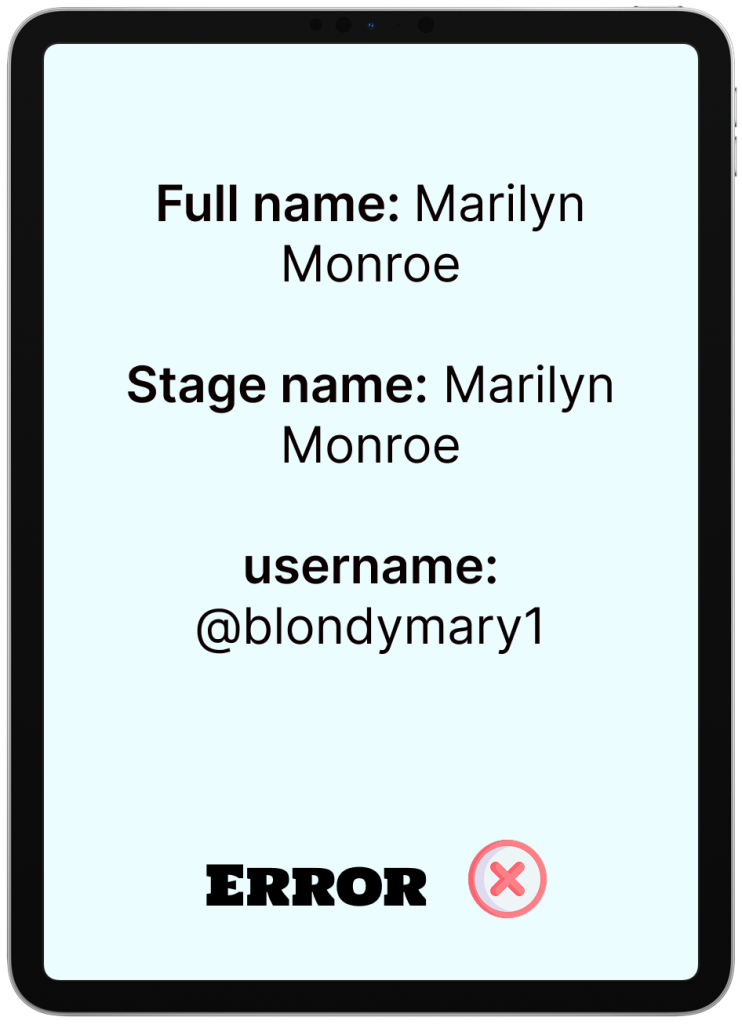
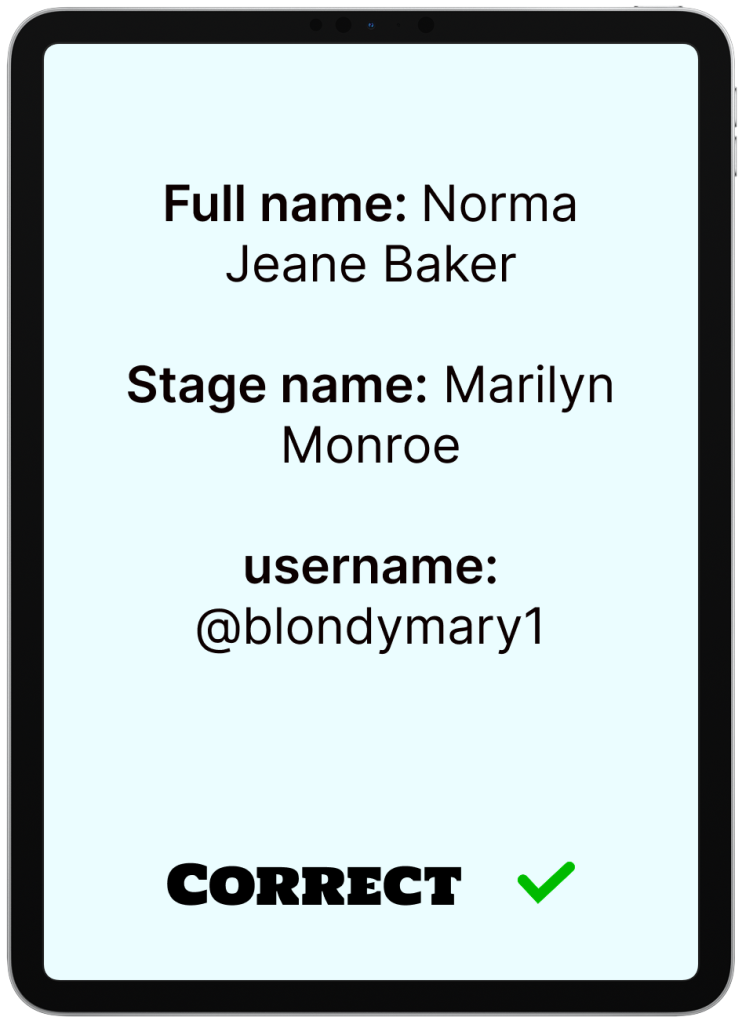
On the left are fields with errors, on the right is the correct version
The second sensitive issue is the date of filming. Moderators check when consent was obtained. A typical problem situation is when content is published in July, but the form says September. Formally, it looks as if consent was obtained after publication. Even if this is not the case in reality, the document begins to raise questions.
In such cases, the platform cannot unequivocally confirm that consent was obtained before the content was filmed and distributed. And if there is no such confirmation, the content automatically falls into the risk zone.
Another mistake is using vague wording such as “August 2026” without a specific date. The rule of thumb here is simple:
- the date must always be filled in;
- it must correspond to the actual day of filming;
- it must logically match the date of publication of the content.
If you are shooting content for several days in a row, it is better to indicate the first date of shooting or a range of dates — but in such a way that it does not cause ambiguity.
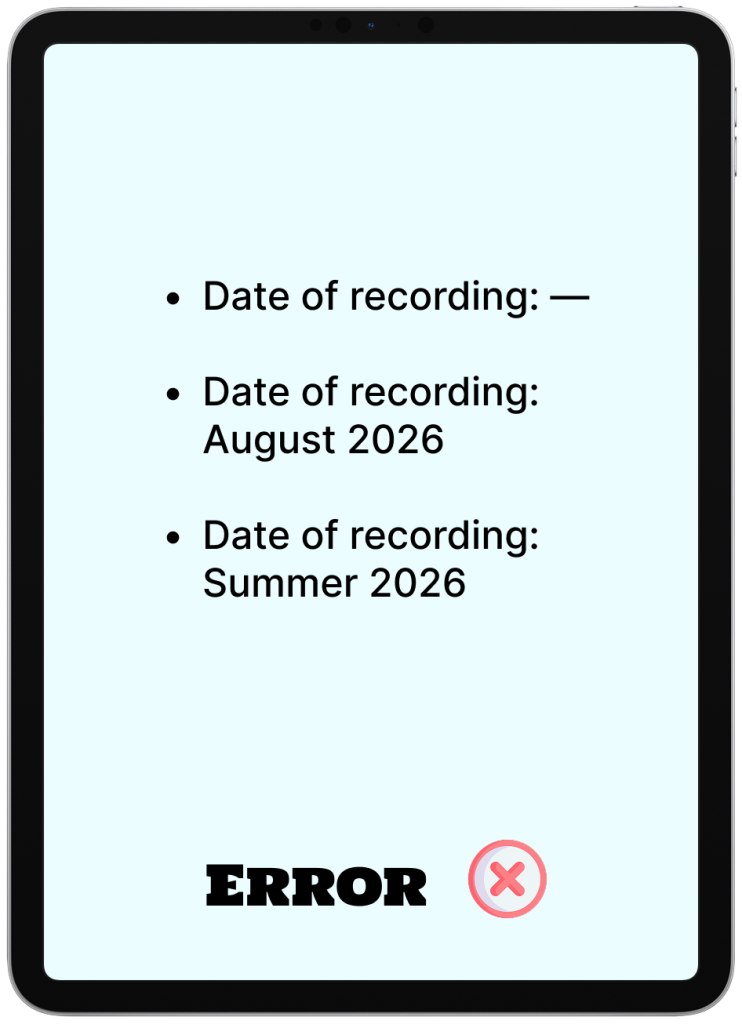
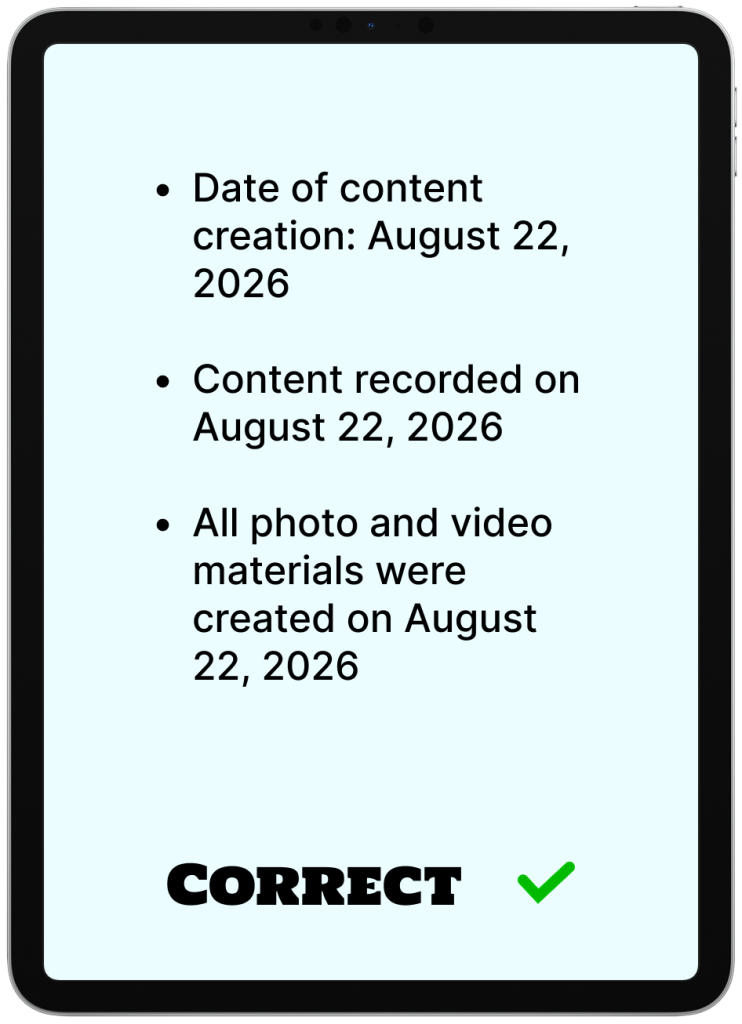
On the left are fields with errors, on the right is the correct version
The description of the content in the release form is one of the most underrated parts of the document. Most often, it is filled out on a residual basis. The main mistake is overly vague wording. In a controversial situation, this leaves room for speculation. A person may claim that they agreed to one thing but received something completely different: they did not know about paid distribution, did not expect publication on OnlyFans, or assumed that the content would only be used privately.
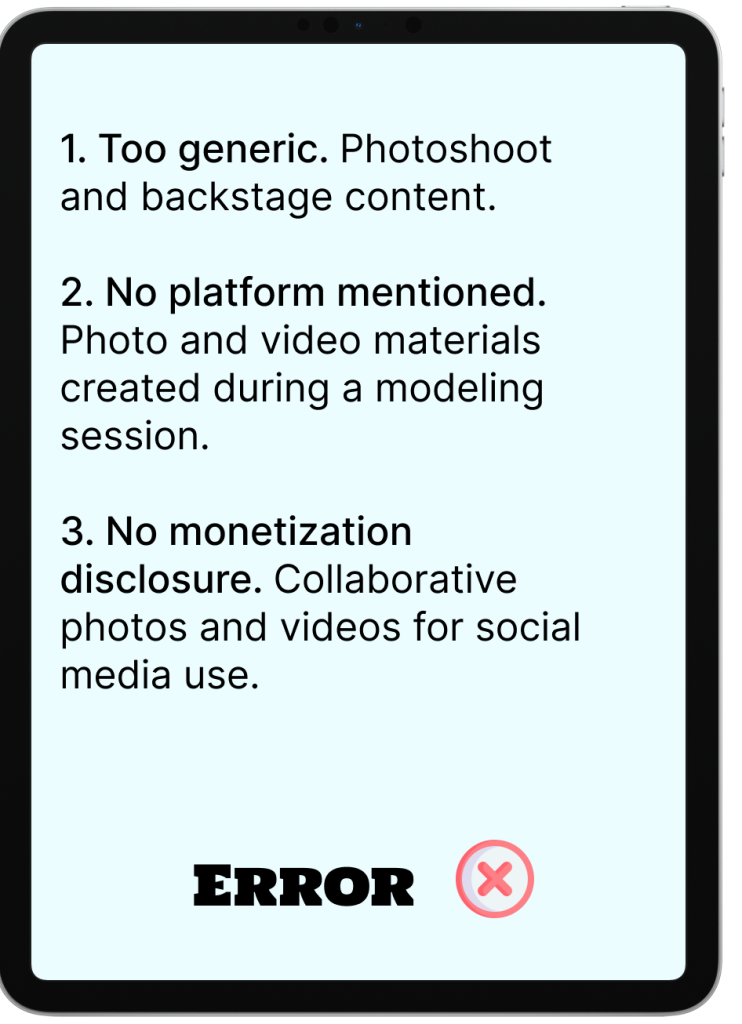
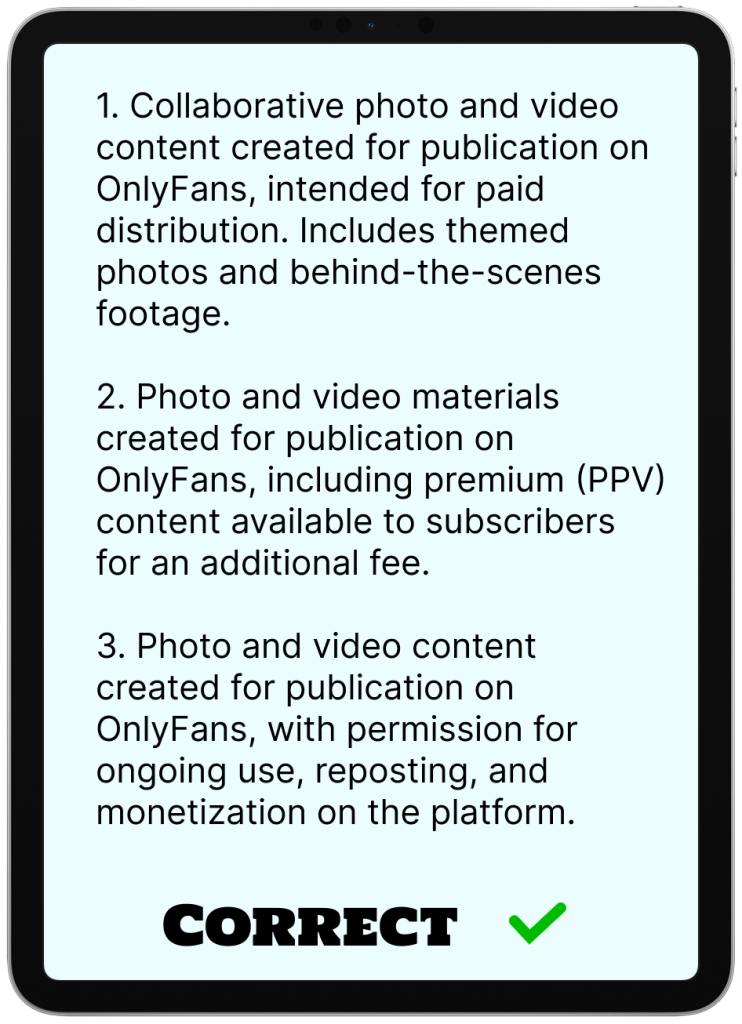
On the left are fields with errors, on the right is the correct version
What else can go wrong
Even a perfectly filled out release form won’t save you if there are problems with identity verification. Let’s look at the platform’s requirements.
- OnlyFans only accepts government-issued documents.
The following are acceptable:
- Passport (photo page)
- Driver’s license
- National ID card (government-issued)
Not acceptable:
- Student ID card
- Library card
- Corporate badge
- Any documents without government status
- The photo or scan of the document must be clear so that the moderators have no questions.
What you must check on the scan:
- All data is clearly legible: name, date of birth, document number
- No glare, blurring, shadows, or cropped edges
- The document is valid
- JPG or PNG format
- For ID cards — both sides
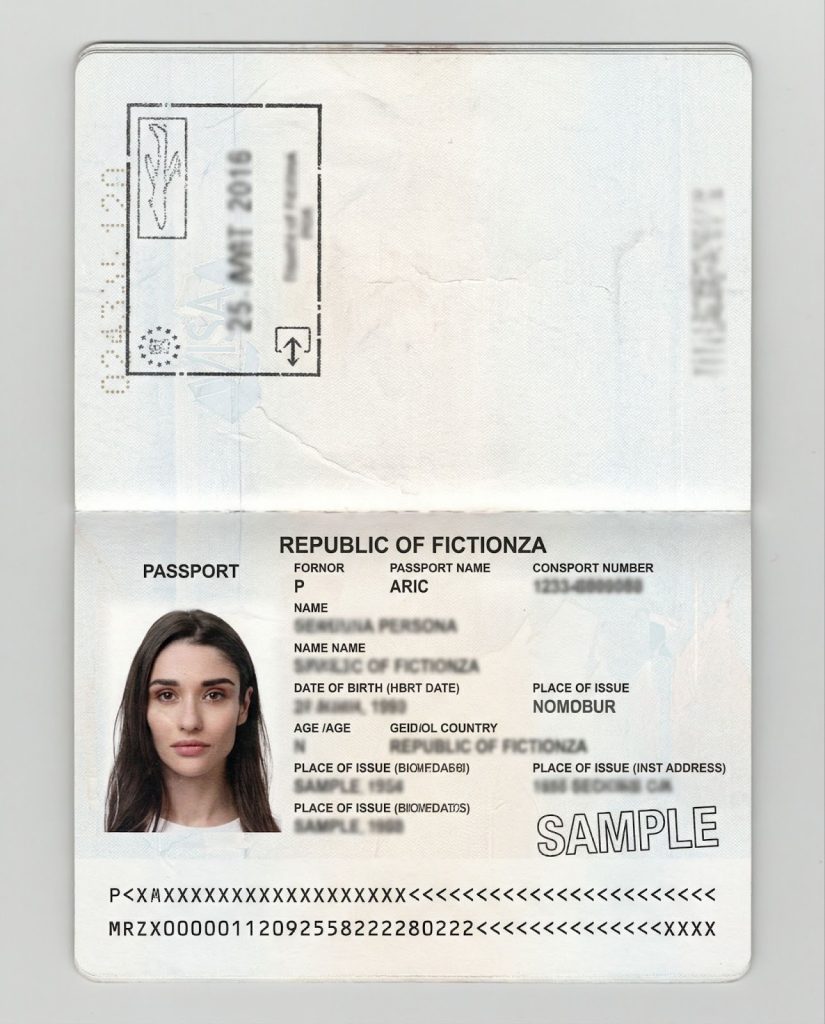
✅ Photo taken in good lighting → the entire document is legible. This image is AI-generated
- Selfie with the document and form. This confirms that the form was signed by the actual owner of the document and that consent was given knowingly. This protects against forged signatures and claims that the co-author did not sign anything.
How to take a selfie correctly:
- The participant holds their open passport next to their face, with the photo page visible.
- On the other hand, they hold the signed form or sheet with the date and account name.
- Everything is legible, nothing is covered.
- The photo was taken on the day of shooting.
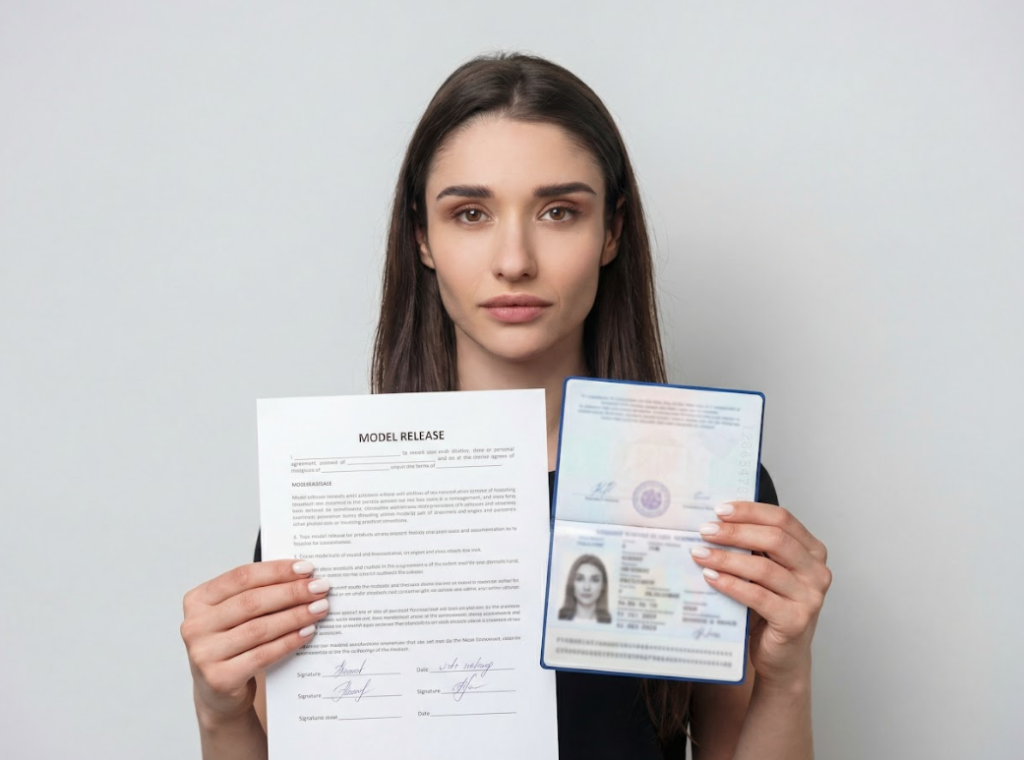
The face, document and form are in the same frame
How to act in different situations
We help models create content in a way that doesn’t violate the rules. Now we’ll tell you how we act in different situations.
Collaboration with OnlyFans models
Many people believe that if a person has an OnlyFans account, that’s enough. In practice, this is not the case — you are still responsible for the content on your account.
What we do:
- before shooting, we ask you to fill out a release form,
- we check that the name on the form matches the name on the document,
- we save your ID and a selfie with the document,
- we record the date of the shoot.
Some creators don’t know how to explain the importance of the form without sounding paranoid. We explain to models how to properly establish dialogue with their future co-author. You need to send a message like this:
| “Before the shoot, I will ask you to fill out a form and confirm your age. The form protects both of us legally. It confirms that you have agreed to participate, that you are 18 years old, and that the content can be monetized. This is standard practice for OnlyFans, not my whim. Imagine signing a contract for a regular job. It will take 5 minutes.” |
Shooting with someone without an account
The model creates content with a partner, friend, or guest who does not have an account on the platform. This is the riskiest situation because the person may underestimate the publicity of the content or change their mind in a few months.
What we do:
- Explain the importance before shooting/ If you explain after the shoot, the person may think, “Why do I need this? I’ve already filmed, why sign any papers?”
- We fill out the complete package: form, ID, selfie
- We make a copy for the partner. This removes the feeling that you are forcing the person to sign something in your favor.
- Discuss compensation, if any, and record it in the form. If you have agreed on payment, add a clause to the form: “Compensation: [amount] to be paid via [method] within [time frame].” Or create a separate agreement to attach to the form.
- Describe the content in detail.
Someone without experience may not understand that “shooting for OnlyFans” = “the content will be sold to thousands of people for money.” It is important to record all the details right away.
How to explain it to your partner:
| “Listen, before we start, I need you to fill out a consent form.Why it’s important:1. Without the form, the content will not pass moderation.2. The form protects both of us: you — from me using the content in a way that we did not agree upon, and me — from claims arising six months later.3. This is a serious legal matter: the form states that you are 18 years old, you agree to be filmed, and you understand that the content will be sold.What you need to do:- Fill out the form — I’ll help if you don’t understand- Take a photo of your passport so that all the information is clearly legible- Take a selfie with your passport and the signed formIt will take 10 minutes maximum. Any questions? |
If a person is not willing to provide documents, it is better not to take any photos or videos with them.
A random person in the frame
There may be different options here.
- If only a shadow or a blurred silhouette is visible, everything is fine
- If the person can be identified by their voice or physical characteristics, ask them to sign a consent form.
- If they do not agree, edit the photo or video so that the person cannot be recognized.
- If, after blurring or blurring, a recognizable face or figure is still visible, it is better not to take any risks and not publish such content.
How to prevent such situations:
- Take a test shot before each shoot. Check what is visible in the mirror or monitor, in the reflection of the window.
- Shoot in a controlled environment. Close the doors so that no one accidentally enters. Draw the curtains and turn away mirrors if they are not needed for shooting.
Selling old content
If a model wants to publish an old collaboration, it is important to consider that the partner may have changed their mind, contact details, or attitude towards the content.
What to do:
- If the partner has previously filled out the form correctly, notify them of the publication, then calmly post it.
- If there is no form, ask them to fill it out.
- If the partner has changed their contact details or is not responding to messages, do not publish or edit and remove their presence.
To avoid confusion about which co-authors have a consent form and which do not, you can keep a table with notes.
| Video Name / ID | Partner | Date | Release Form | ID Verified | Notes |
| Video_2023-03-15 | Anna K. | 2023-03-15 | ✅ Signed | ✅ Yes | Can publish anytime; send courtesy message if >1 year passed |
| Video_2024-07-20 | John D. | 2024-07-20 | ✅ Signed | ✅ Yes | Private PPV; keep B-roll copies for archive |
| Custom_2025-01-10 | Sarah L. | 2025-01-10 | ✅ Signed | ✅ Yes | Custom PPV ordered by @user123; prepayment 50% received |
| Travel_2025-06-05 | Miguel R. | 2025-06-05 | ✅ Signed + Translation | ✅ Yes | Shot in Spain; English form + Spanish translation stored |
| Archive_2022-12-01 | Lisa M. | 2022-12-01 | ❌ None | ❌ No | Partner unavailable; only for personal archive, no publishing |
PPV videos with a third party
PPV is paid exclusive content, pay-per-view. Sometimes models create private photos or videos for a specific subscriber. They think that since it’s not a public post, a form isn’t necessary. In reality, a consent form is required for any type of content.
What to do:
- The subscriber orders a custom item → you discuss the details.
- You agree with your partner on the shoot.
- Your partner fills out the form and takes a selfie.
- You shoot the content.
- You send it to the subscriber.
In the content description, be sure to add that it will be PPV for a specific subscriber or group.
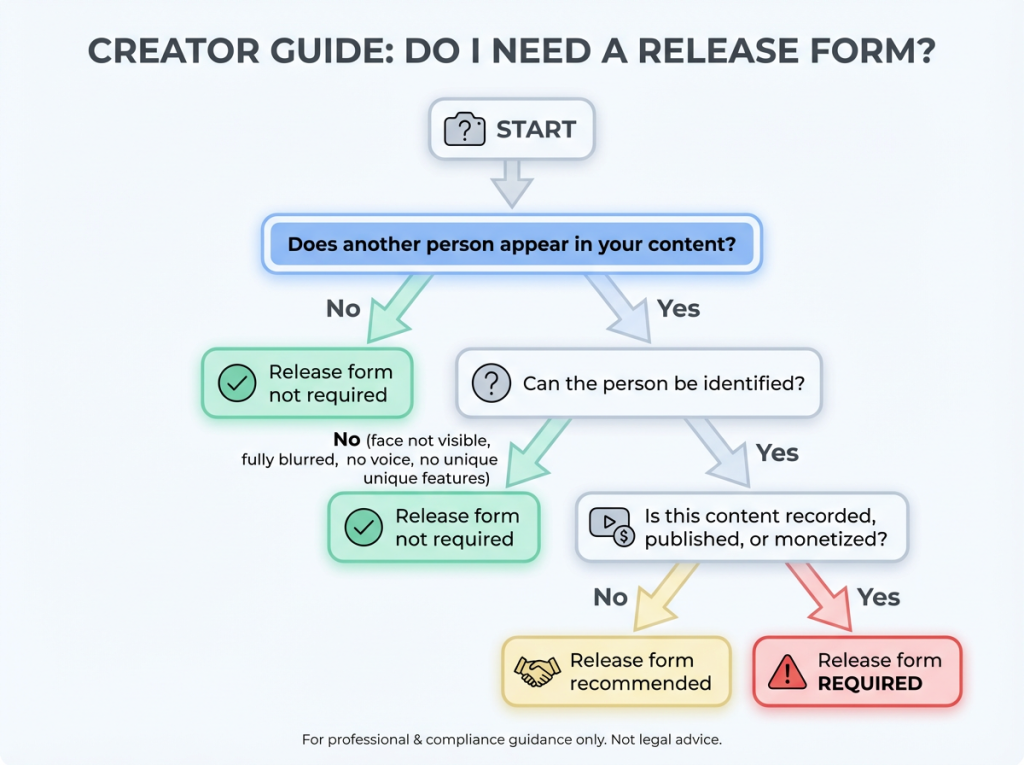
Content shot in another country
OnlyFans is subject to US law, so you must always fill out the consent form, even if you are shooting content while on vacation in Spain.
Things to consider:
- In some countries, shooting 18+ content is completely prohibited — study local laws.
- Make a copy of the form in the co-author’s language if they do not speak English.
- Keep multiple copies of scanned documents: in the cloud, on a flash drive, and in the memory of your mobile device. This will help you protect your content in case of loss of personal belongings or unstable internet connection.
How to protect your account and content
- Participant data: full name as in passport, age ≥18 years.
- Content: clear description, type (PPV / Feed / Custom), consent to monetization.
- Signatures: both parties, date; for old content — notify your partner.
- Documents: only government ID, clear photo/scan, selfie with document + form.
- Special cases: third parties — form is mandatory; random people — blur or consent; old content without form — do not publish; abroad — comply with laws, keep translations.
- Storage: table with video, partner, date, form, ID, notes; copies in the cloud and on the device.
- Pre-publication check: form and ID are correct, description matches, notify partner if necessary.
- Red flags: ID mismatch, refusal to provide documents, blurred or expired documents — do not publish.
Read also:
Author

Want more paying OnlyFans subscribers?

Launch a campaign in 24 hours and fill your creators’ pages with real fans, not freebie hunters.
Recent partner average: $4.24 back per $1 spent • 324% ROMI
Real people only. No bots, no spam traffic sources.
ONLY FOR ONLYFANS AGENCIES, MODELS, AND MARKETERS
Want to promote your OnlyFans profile?
Start getting paying subscribers from search. Launch in 48 hours.
Recent partner average: $4.24 back per $1 • 324% ROMI