
Share:
Live streaming on OnlyFans is not only a tool for engagement, but also the fastest way to monetize. While some creators limit themselves to photo and video content, others earn thousands of dollars in just a few hours on air.
In this article, we’ll break down how to start streaming on OnlyFans, what equipment you need, how to broadcast so that people don’t leave after 5 minutes, and most importantly, how to monetize livestreams so that every minute on air brings in money.
Why stream at all when you can just post photos
Let’s be honest: nude videos are available everywhere for free. Any subscriber can find thousands of explicit videos in three clicks. So what are you getting paid for? For the illusion of intimacy. For the feeling that you are talking to them specifically, calling them by name, responding to their words right now. Livestreaming breaks down the barrier between the content creator and the real person. You cease to be just a picture on the screen — you become alive, accessible, real.
In addition, streams generate a decent income. The economics are straightforward: four hours of filming, editing, and posting can bring in around $200 in tips and PPV, while one hour of livestreaming can generate between $500 and $1,000 in tips directly during the broadcast. This is the most profitable content format on OnlyFans in terms of time spent.
But there is a caveat: not every stream brings in that kind of money. Most newbies turn on their cameras, sit in awkward silence, earn twenty dollars an hour, and never stream again. Because they’re doing it wrong.
Technical requirements for starting a stream
Streams are only available to verified accounts (passport + selfie with passport verified and approved). You must also have at least five subscribers and five published posts on your wall. This is how OnlyFans protects itself from bots, scammers, and people trying to do something illegal. Five subscribers and five posts are the minimum proof that you are a real person and not a fraud.
To start streaming, you will need a device with a camera, whether it be a smartphone, tablet, or laptop, and a stable internet connection with a minimum upload speed of 5 Mbps. To check your internet speed, go to speedtest.net, click «Go», and look at the Upload number.
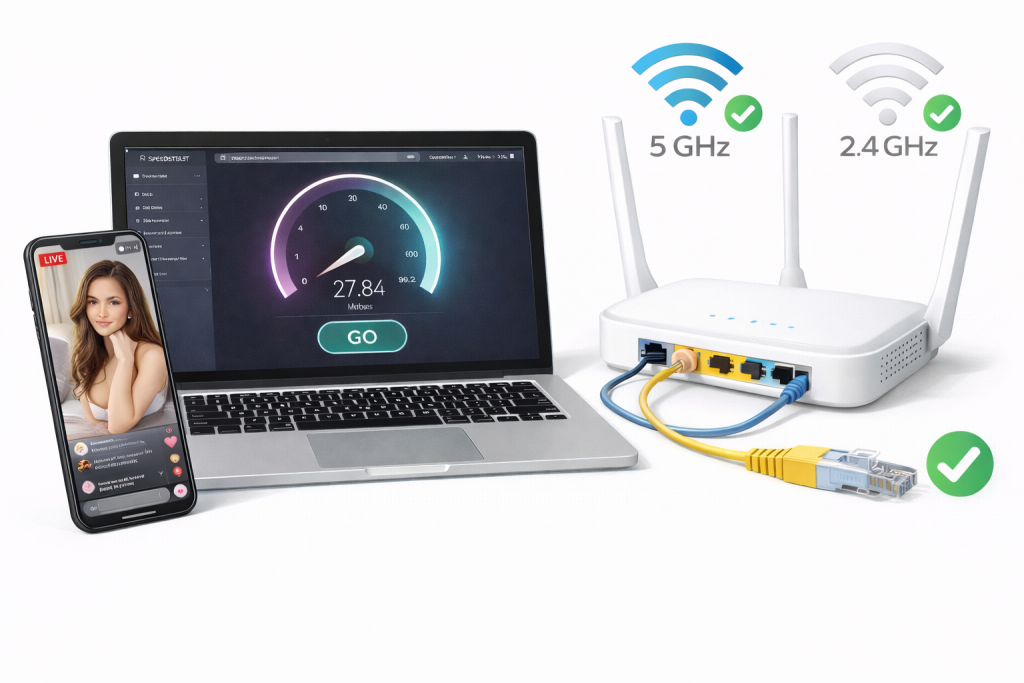
If your upload speed is under 5 Mbps, your stream will buffer and lag. If that happens, switch from mobile data to Wi-Fi. Use 5 GHz Wi-Fi instead of 2.4 GHz — you can change this in your router settings
Disconnect other devices from the network during your stream and move closer to your router. Ideally, use a direct Ethernet cable connection, though you’ll need an adapter for your phone.
What to do before your first stream
Don’t turn on your camera until you’ve answered a few key questions for yourself:
What’s your comfort level? A livestream doesn’t necessarily mean full nudity from the very first second. You can start in lingerie, where you show and tease but don’t get completely naked. Or you could do a Q&A in revealing clothing, where you answer questions and flirt. You could have a lingerie try-on haul, showing off different sets, or a cosplay party where you showcase your outfits.
Define your boundaries before you turn on the camera. Under pressure from the audience, it’s easy to agree to something you’ll regret later. Decide in advance: what you will definitely do, what you definitely will not do, and what depends on the tip amount.
Will you show your face? Many successful creators stream without showing their face, using masks — surgical, carnival, latex — or they choose angles from the neck down, focusing on their body rather than their identity.
Of course, with your face showing, you have every chance to establish a deep connection with your audience, receive higher tips, and engage people thanks to your facial expressions, smile, and eye contact. But there are also downsides: it’s hard to maintain anonymity in your real life.
What’s your monetization strategy? Decide this before you start.
- Will entry be free for subscribers, or will you charge a pay-per-view fee (between $5 and $50)?
- What will your tip menu be? List specific actions and their prices.
- What’s your tip goal? (e.g., $200 = I get fully naked)
- What’s the reward for hitting that goal? If you’re making this up on the fly, you’ll look unsure of yourself and leave money on the table.
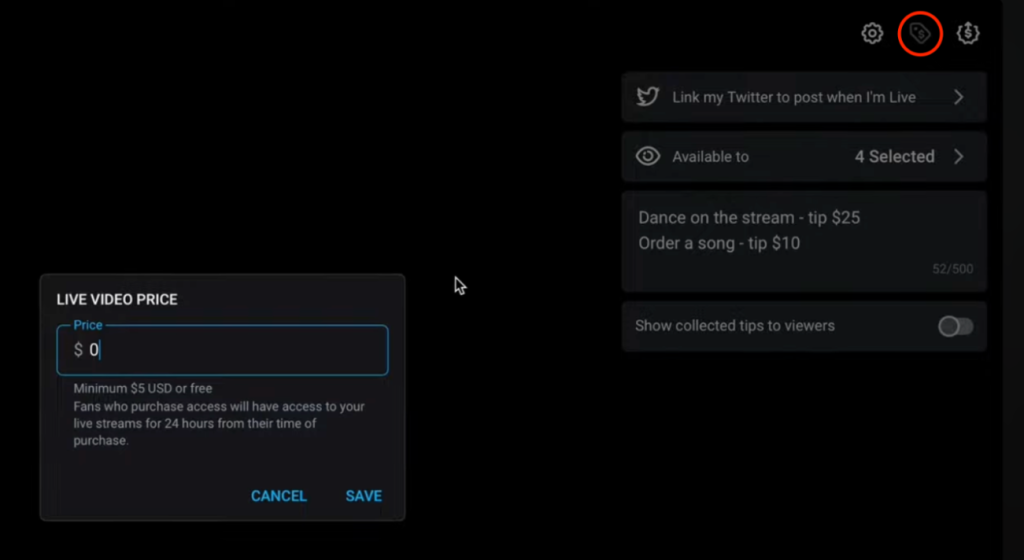
Set a price for any exclusive videos you might offer, like a recording of this stream, before you go live
How to technically start a stream
The easiest way is through the mobile app. Open the OnlyFans app on your smartphone. On the main screen, find the camera button. It’s usually a round button with a camera icon at the bottom center, or a plus sign button in the top right corner.
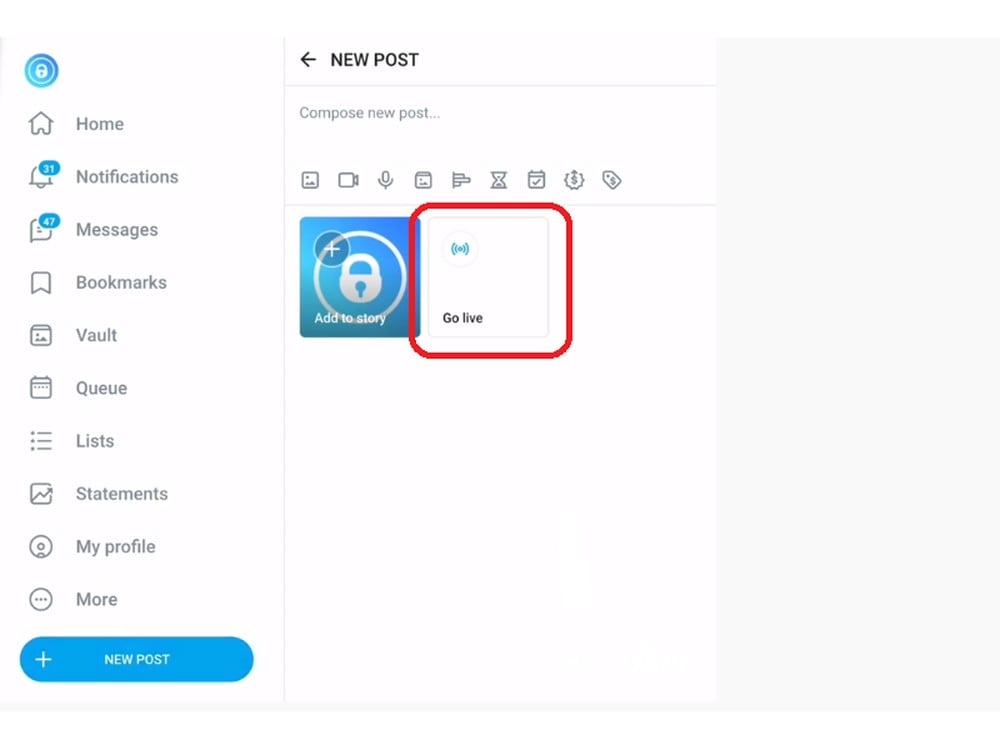
Tap it and select Go Live or Livestream. You’ll be asked for access to your camera and microphone — tap Allow
If you accidentally hit «Deny», on iOS, go to Settings, find OnlyFans, and turn on Camera and Microphone. On Android, the path is: Settings → Apps → OnlyFans → Permissions, then allow Camera and Microphone.
Now, let’s move on to the stream settings:
Enter a title. This is the first thing subscribers see in the notification, so the title should be catchy, intriguing, and make a promise. Options like «Hi everyone» or just «Stream» won’t hook anyone — it’s unlikely that anyone other than your most devoted subscribers will show up.
Good examples:
- First time fully naked on stream🔥 — creates intrigue.
- Tip to control what I do😈 — promises interaction.
- Help me celebrate 1000 subs🎉 — turns the stream into an event.
- Late night secrets… ask me anything😏 — hints at intimacy.
- New toy testing — your votes decide🎁 — gives a specific promise.
The simple formula is: Specific promise + Emotional trigger + Emoji
Add a description. Add details: what will happen, why watch, what are the goals. For example:
Celebrating 500 subs! 🎉
Tip menu:
$10 = flash
$25 = remove 1 item
$50 = 5 min your choice
Goal: $300 = full nude oil show 🔥
Let’s make it happen together!
Choose your audience. Determine who will be able to see your stream. All subscribers means absolutely all subscribers, including those on a free trial. Paid subscribers only — only subscribers who pay a monthly fee. Specific tier — a specific subscription level, if you have VIP tiers.
For your first stream, we recommend choosing «All» so as many viewers as possible come. Choose «Paid only» when you have a loyal base of sponsors. You can also set an entry price— an additional fee for access to the stream, up to a maximum of $50. But only do this if it’s a special event or unique content.
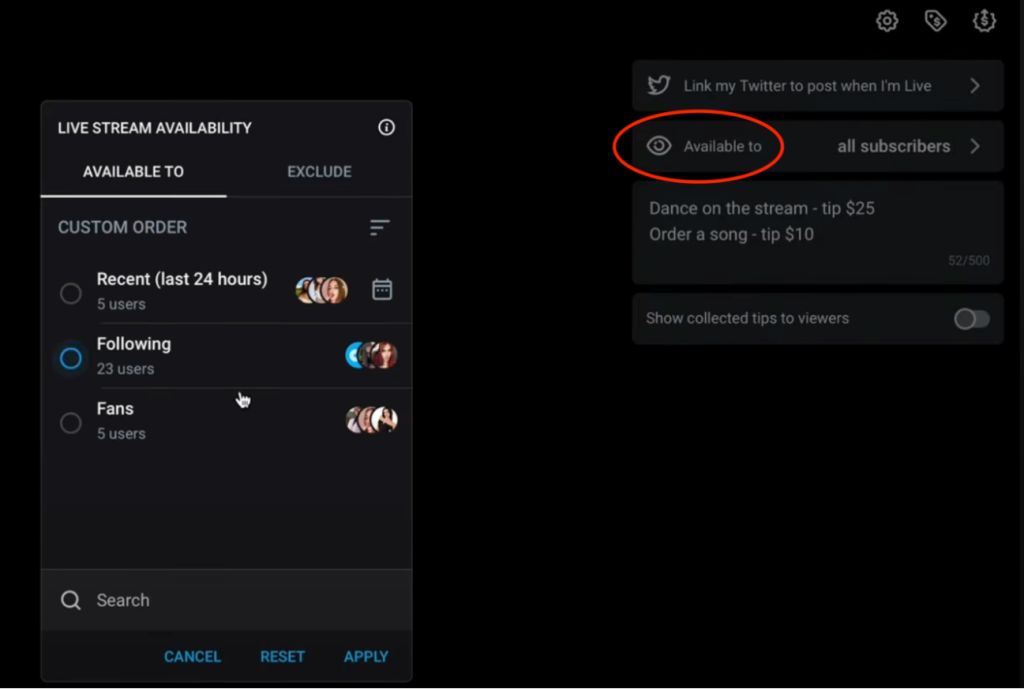
The psychology of pricing works like this: $5-10 is a low barrier, gets you more people; $15-25 is the mid-range; $30-50 is premium, only for loyal fans
Set a Tip Goal. Find the goal icon, usually looking like a target or a flag in the corner. Fill in the amount to collect, for example $200, describe the reward, like «Full nude plus oil show» or «Ten minutes of toy play», and make the progress visible to your viewers.
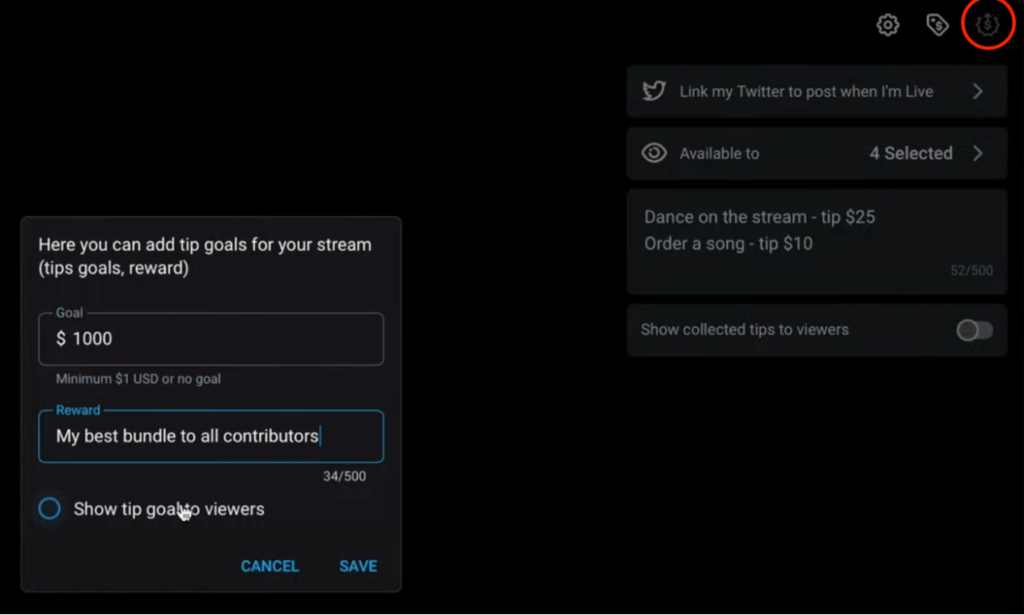
Having a concrete goal creates a collective motivation and encourages people to send tips — no one wants to stop at $195 out of $200
Check the preview before going live. Check how you look to your viewers. Make sure the camera is at the right height, your face is well-lit, the background is clean and free of personal items, and there are no weird shadows.
Tap Start Live Stream. You’re live. The first ten seconds are critical. Don’t be silent, even if there are no viewers yet. Immediately start talking: Hey everyone! So happy you’re here! Give me a sec while people join… Fix your hair, smile, create an atmosphere. Then: Okay, let’s start! Who’s ready for some fun?
Via a web browser on a desktop, the process is similar. Go to onlyfans.com through Chrome, Firefox, or Safari. Click «Home» in the left menu. Find «Go Live» at the top, next to the «create post» button. Allow camera and microphone access in your browser.
If your webcam isn’t working, close other programs like Zoom or Skype, check your browser settings in the Privacy section, and try a different browser.
Pros of desktop: a bigger screen for monitoring comments, easier to keep your tip menu open in another tab, and you can use a professional webcam. Cons: it’s harder to change angles, and the cameras built into laptops are usually low quality.
What equipment you actually need
Smartphone. If you have an iPhone 13 or higher, Samsung S9 or higher, or an equivalent — to start, this is more than enough. Once your income grows, you can buy a 1080p webcam like the Logitech C920 or C922, or a Logitech Brio in 4K for maximum quality.
Lighting. A 10-12 inch ring light with adjustable brightness ($20-40 on Amazon/AliExpress) will do. Good lighting does more for your video quality than an expensive camera. Your face should be evenly lit, without harsh shadows.
A free alternative is natural light from a window, but this only works during the day and depends on the weather. But if your income is growing, get a Softbox kit with two or three light sources for professional lighting.
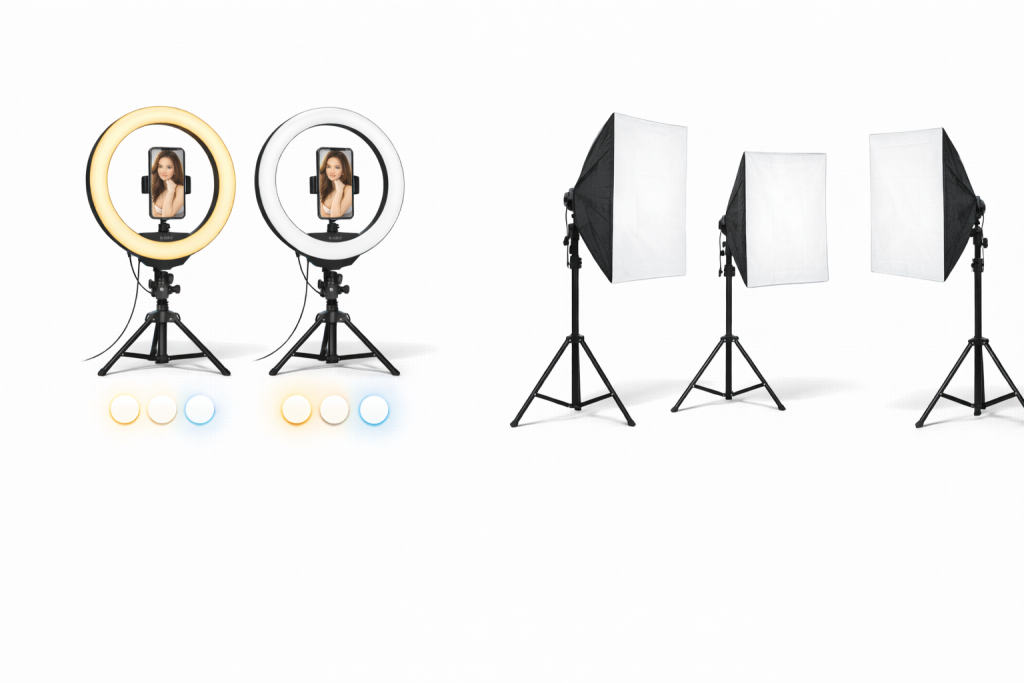
Look for models with adjustable brightness, warm and cool light settings, and a phone holder in the center for convenience
Phone holder. For example, a tripod. It needs to be sturdy because a falling camera in the middle of a stream is a disaster.
Microphone. To start, the one built into your phone will work, but if the sound is bad, add a lavalier microphone that plugs into your headphone jack.
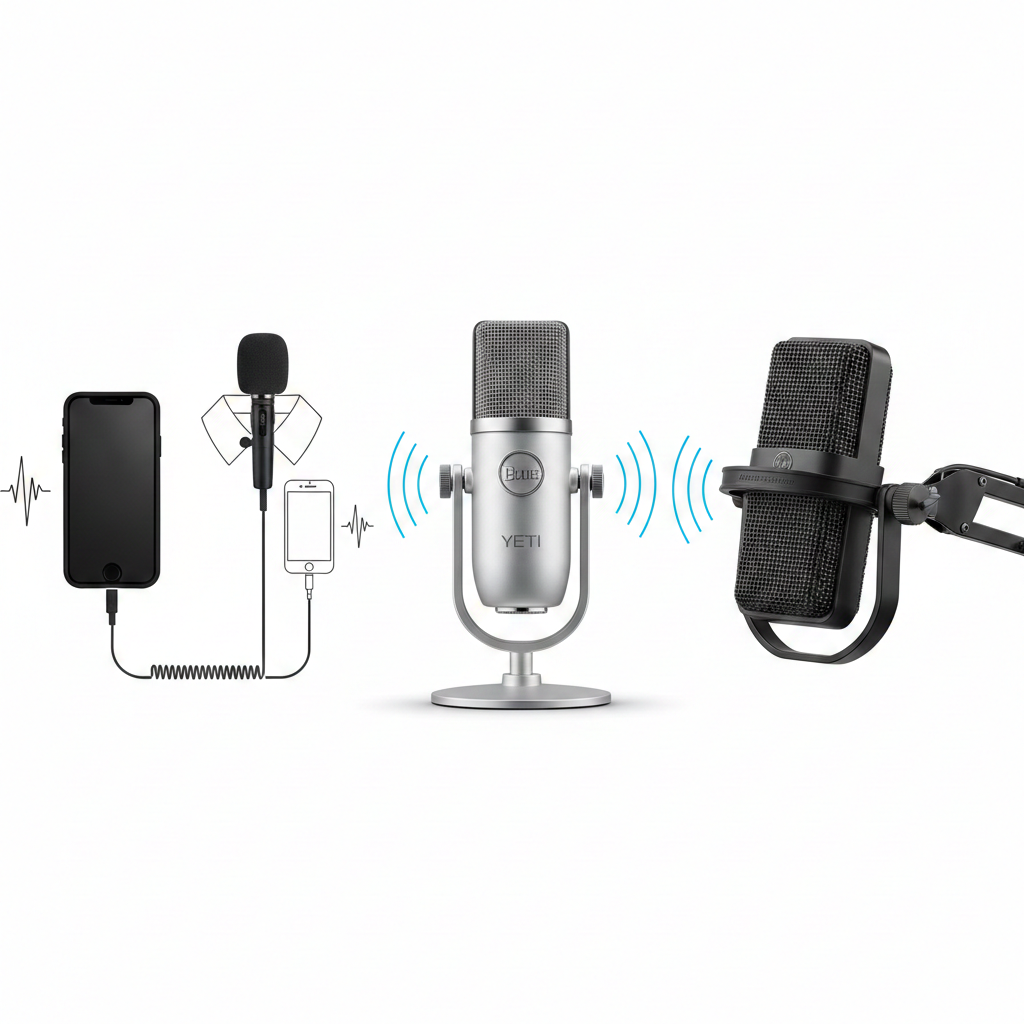
Over time, buy a more professional model like the Blue Yeti or Audio-Technica AT2020USB+ — it makes your voice cleaner, without echo
Start with the minimum setup. When you start consistently earning $2,000 or more from your streams, then invest in equipment.
Pre-stream preparation: the complete checklist
Define your theme and format. For example:
- Q&A in revealing clothing.
- A show with progressive stripping as you reach tip goals.
- A themed show with a role, like a nurse or teacher.
- Viewers control the action through tips.
- Showing the process of creating content.
- Trying on different outfits based on requests.
- Just chatting in a comfortable setting.
Create a tip menu specifically for this stream. For example:
- Tip $5 to ask any question! Tip $15 for a spicy question 🔥 Tip $25 and I’ll answer while doing something special 😏
- I have 3 outfits ready! Vote with tips: $15 + comment A = red lingerie, $15 + comment B = nurse outfit, $15 + comment C = latex. Winner in 5 minutes!
- Let’s play Truth or Dare! Tip $20 + your dare in comments. I’ll do the hottest one!
- 🎰 LUCKY TIP GAME 🎰 Tip any amount! Every 7th tipper wins double their tip in content. Current count: 4/7
- 🎂 BIRTHDAY CELEBRATION 🎂 It’s my birthday month! All tips today get DOUBLE content 🎁 Biggest tipper wins 15-min video call!
Create an announcement. A post on your wall should contain the date, time with time zone, theme of the stream, tip goal and reward. For example:
🔴 GOING LIVE 🔴
📅 Friday, Feb 14
⏰ 8 PM EST
🎯 Valentine’s Special Stream
💸 Goal: $400 for [reward]
This is gonna be HOT 🔥
Set your reminders!
Comment + if you’ll be there!
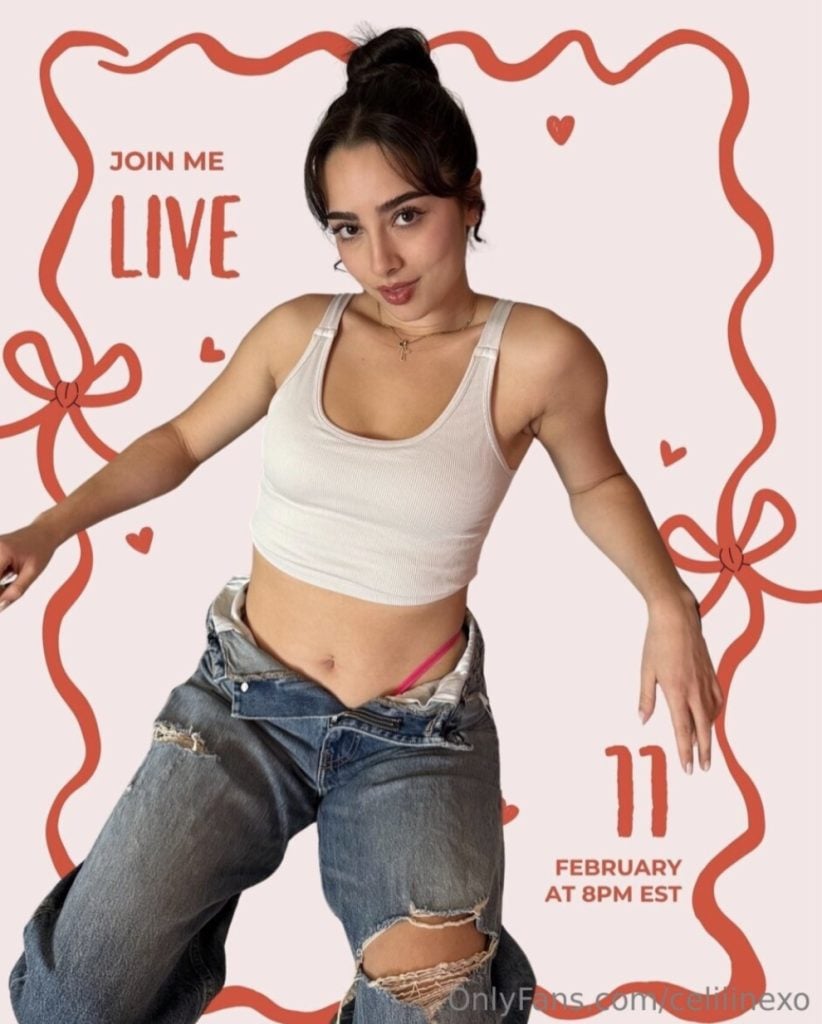
Example of an announcement on OnlyFans
Send messages to your top sponsors. For example: Hey babe! Quick heads up — I’m going live Friday at 8 PM! It’s gonna be special, and I’d love to see you there. Can I count on you?
Why this is important: people forget. You might have five hundred subscribers, but if no one knows about the stream, ten people will show up. With an announcement, fifty or more will show up.
Get ready. Take a shower, do any hair removal if it’s part of your image, apply your makeup, fix your hair, do your manicure and pedicure if they will be in the frame. Do your makeup slightly brighter than usual because the camera washes out color, and what looks normal in person might look pale on screen.
Prepare your space. The background is critically important. Tidy up anything unnecessary, including photographs, documents, diplomas, letters. No windows with recognizable views. Hang some LED strips in red or pink, arrange some decorative pillows, dim the main overhead light and use accent lighting.
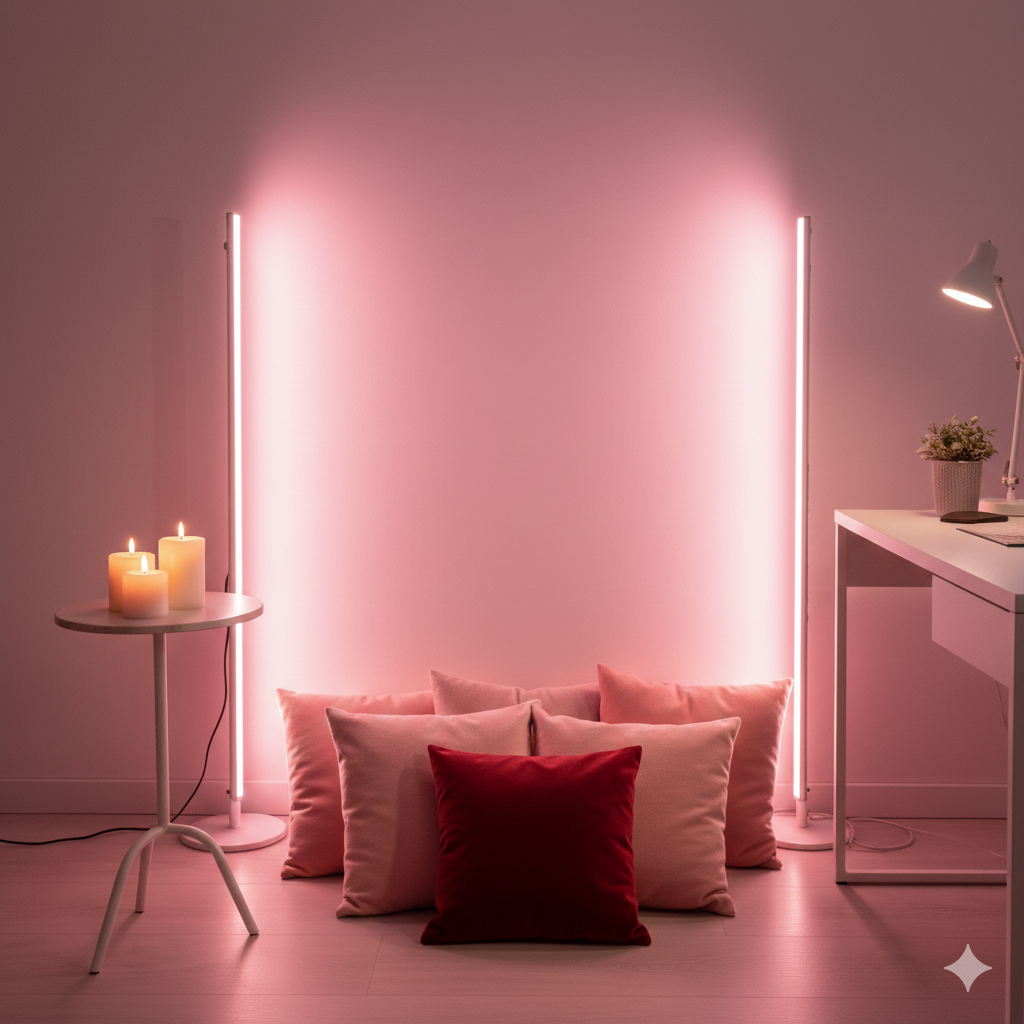
You can add candles, but not near fabrics
For safety, lock the door, warn your housemates or roommates not to enter, and turn off notification sounds on all nearby devices.
The technical checklist is simple:
- Charge your phone to 100% or plug it into the charger during the stream.
- Check your internet on speedtest.net — your upload speed needs to be 5 Mbps or higher.
- Close all unnecessary apps on your phone.
- Turn on «Do Not Disturb» mode so calls don’t interrupt your stream.
- Test your camera and microphone.
- Set up your lighting.
- Make sure your phone holder is stable.
Thirty minutes before the stream, get dressed. Prepare two or three changes of clothes if you plan to change. Put a bottle of water nearby because you’ll be talking a lot. Open your tip menu on another device for reference. Prepare a playlist of background music.
Fifteen minutes before send a final reminder post for your subscribers: 🔴 LIVE IN 15 MINUTES 🔴Getting everything ready… Who’s joining me? 😏
Take a deep breath, smile at the camera, remind yourself that you’re in control and you have a plan. Turn on the confidence.
Stream structure: from start to finish
Warm up your audience. Create a friendly atmosphere and gather your first viewers. Greet people as they join the stream: Hey everyone! Oh my god, so happy to see you all here! Call out subscribers’ names as they appear — [Name 1], welcome! [Name 2], hey babe! [Name 3], thanks for coming! Give me just a second while more people join… Fix your hair, check the camera. How’s everyone’s evening? Anyone doing anything fun this weekend?
Ask light questions, smile, and create a cozy atmosphere. Don’t be silent, even if no one is answering yet. Play some background music — something light and unobtrusive, not too loud, so your voice can still be heard.
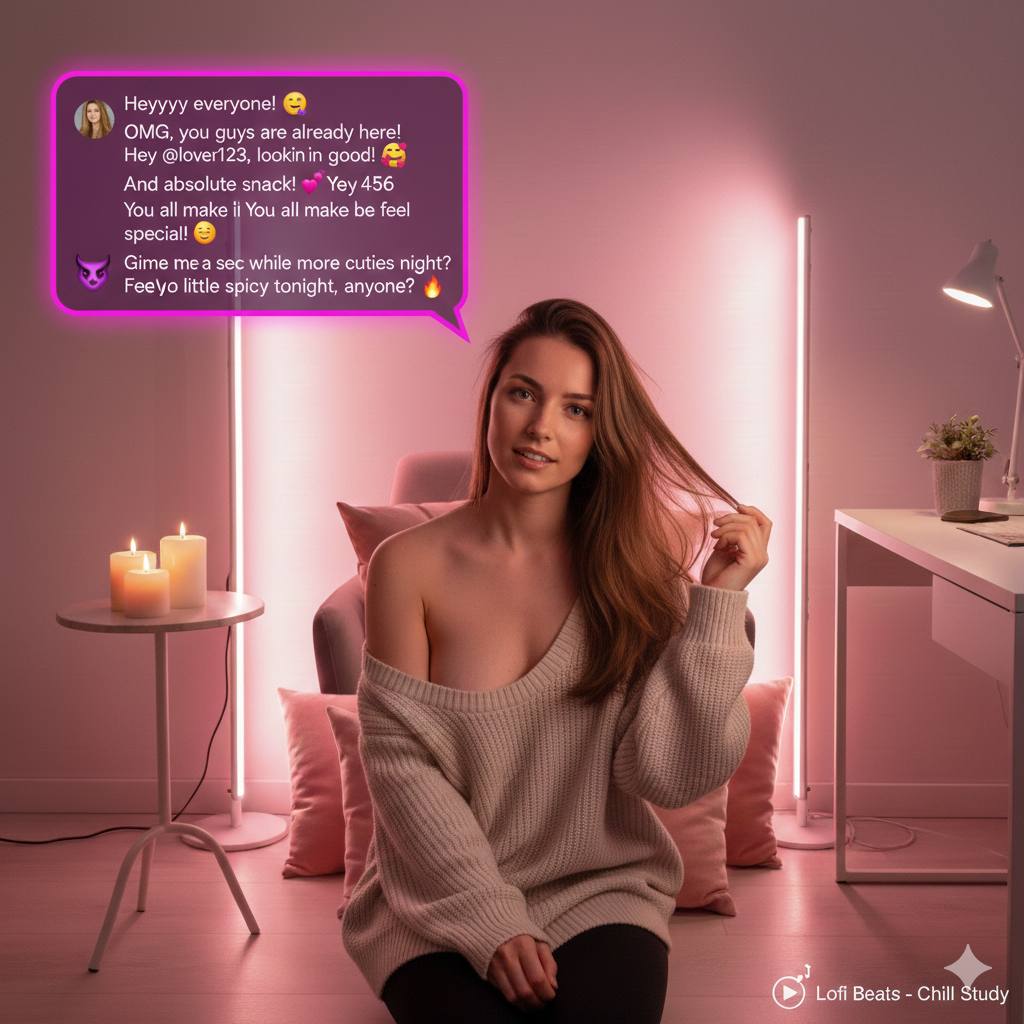
Don’t ask for tips immediately, don’t be silent and stare awkwardly at the camera. Don’t complain about being tired. Don’t apologize for how you look
Explain today’s format. You need to explain to viewers what will be happening and how to participate:
«Okay, looks like we have a good crowd! Let’s get started! So here’s what we’re doing today: This is a goal-based show! 100$ — bra comes off, 200$— fully topless, 300$— panties off, 400$— oil show starts. We’re at zero right now, let’s see how far we can go! Plus my tip menu is active: 10$ — flash, 25$ — remove any item you choose, 50$— five minutes of whatever you want. Sounds good? Who’s ready to have fun?»
Visualize the goals if possible; write the progress in the comments or keep a piece of paper with the goal written on it in the background.
Use the technique of constant engagement. Every three to five minutes, give your audience a reason to interact. Ask questions like «Quick poll: who prefers A or B? Type A or B in chat!» Create micro-challenges: «Next person to tip twenty-five dollars gets to choose which song I dance to! Who’s it gonna be?»
Tease the next level: «We’re at hundred eighty out of two hundred… Just twenty dollars more until I’m fully topless! Who wants to see that happen?» Give thanks: «Thank you username for thirty dollars! You just unlocked …. Everyone says thank you!»
Alternate content blocks:
- Five to seven minutes of Q&A: «Let’s do some questions! Tip five dollars and ask me anything, tip fifteen for something spicy».
- Interactive for five to ten minutes: «Tip twenty dollars and tell me what body part you want to see, I’ll show everyone’s requests!»
- Reminder of tip progress every ten to fifteen minutes: «Okay, let’s see where we’re at… We’ve hit two hundred twenty! That means topless check. Only eighty away from panties off! You guys are amazing».
- Change of outfits, if planned: «Okay, some of you asked for outfit change… Give me two minutes, I’ll be right back! Don’t go anywhere!»
Ending the stream. Your goal is to end on a high note, thank everyone, and announce the next stream.
«Oh my god, we did it! We hit four hundred! You guys are absolutely incredible! Let me give special shoutouts to our MVPs tonight: username 1 with hundred twenty dollars you’re a legend, username 2 with eighty-five thank you so much, username 3 with sixty-five you made my night! And thank you to everyone who tipped, even five dollars! Every single one of you made this happen. I had so much fun tonight. I’ll be going live again next Friday, same time! Set your reminders! Sending kisses to all of you. Good night, babes!»
If you have achieved your goal, fulfill your promise — put on a show, undress, depending on what you promised. Don’t end abruptly; give people two or three minutes to say goodbye and write comments.
Monetizing streams
Create a clear price-action scale so that people understand what they will receive for each amount. For example:
💸 LIVE TIP MENU 💸
$5 = Show a part of your body for three seconds
$10 = Answer any question honestly
$15 = Show a close-up of a part of your body (30 seconds)
$25 = Remove one item of clothing
$40 = Apply oil or lotion to a selected body part
$60 = Interaction with a toy (3 min)
$100 = 5 minutes doing whatever you say
$150 = Toy (10 min)
$200+ = Surprise 🎁
Psychology works like this: prices rise progressively, creating an escalation, and each level seems like a logical continuation of the previous one.
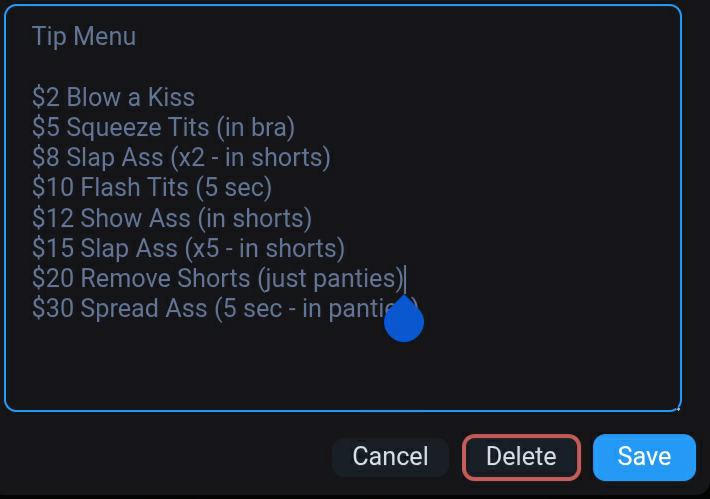
Example tip menu for streaming
Strategy 2. Common goal. Set a goal that is visible to everyone. People like to be part of a collective achievement. For example: «The goal is $300. When we raise $300, I’ll do a full show with nude oil. Progress: 180 out of 300, 60%. We’re so close! Who’s going to give us a push?»
Update your progress every $20-30: «Oh my god, we just passed the $200 mark! Only $100 left until the oil show! You guys are incredible».
Strategy 3. Public recognition. Thank each donation out loud — it motivates others. Respond instantly: «Wow, thank you, [name], for $50! That’s so generous! You just unlocked a reward. Let’s all say thank you to [name]».
Periodically remind the audience of the names of the top sponsors, once every 15 minutes: «Let’s welcome our heroes: gold — [name 1], $120, silver — [name 2], $85, bronze — [name 3], $60. Thanks to you, the show is getting hotter».
Strategy 4. Limited-time offers. Create artificial urgency. Hot offer: «Only the next five minutes! Donate $30 right now and get something that usually costs $50. The clock is ticking… now!” Five minutes later: “Time’s up! Back to regular prices».
Encourage people to be the first: «The first three people to donate $40 will receive a personalized photo with your name after the stream! Two out of three spots left. Who’s next?»
Strategy 5. Voting and controlling what happens through tips. Give viewers the power to decide what happens. This could be a voting format: “What should we film next? Donate $20 and write in the comments: A — bra, B — panties. Voting closes in three minutes! The option with the highest number of votes wins».
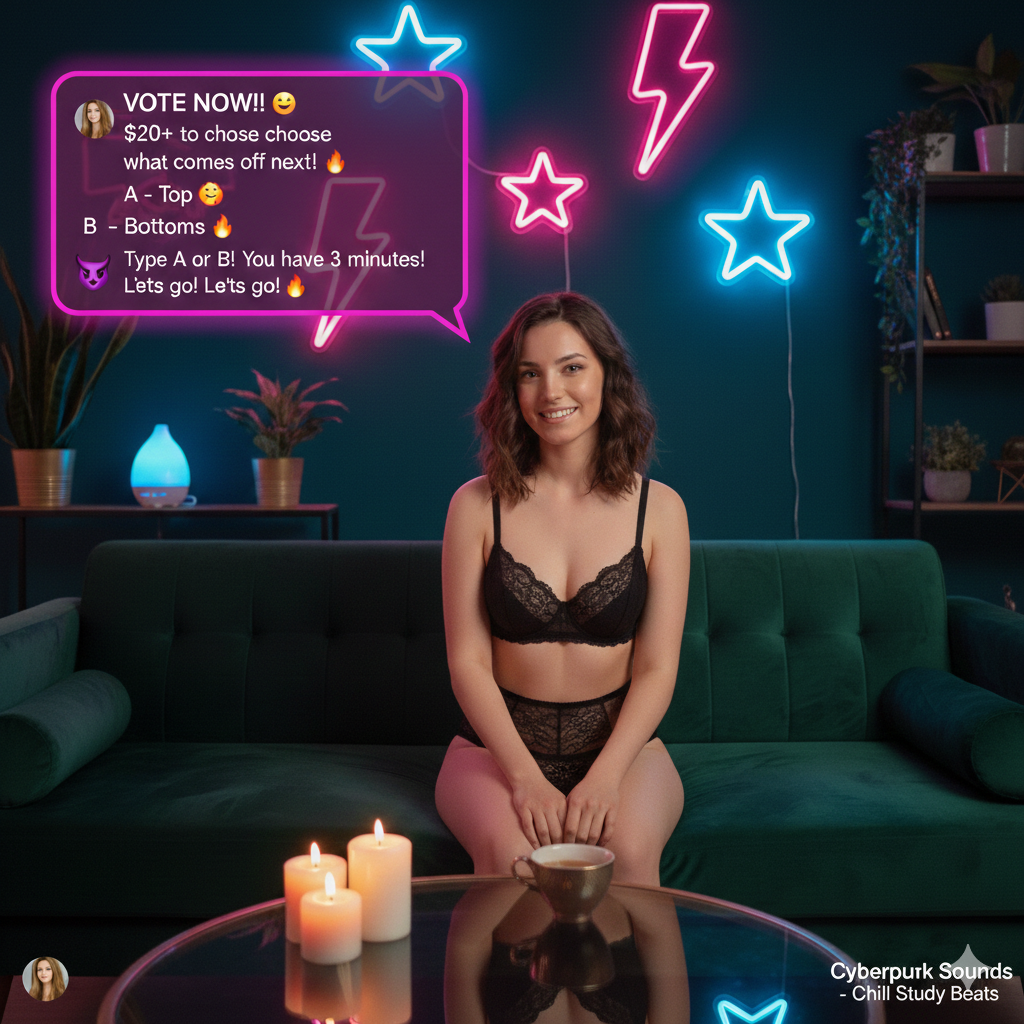
People love power, the feeling that they are in control of the process and deciding what happens next. But set clear boundaries in advance, say what you definitely won’t do, otherwise you’ll get awkward requests
Common mistakes when streaming
Silence and passivity. You turn on the camera, sit silently, and wait for someone to say something. This is a bad strategy: people will leave because no one is interested in them. Talk constantly, even if there are no viewers, ask questions, comment on the music, talk about your day, create an atmosphere.
No tip menu. «Well, tip us, we’ll think of something». People don’t understand what they’re paying for, they don’t like buying a pig in a poke, it creates the impression that you don’t care about your viewers, you just want to make money. Create a clear menu before the stream, pin it in the first comment or write it on a piece of paper and hang it so that it is visible in the background.
Ignoring small tips. Someone threw in $3, and you didn’t react because the amount seemed too small. The subscriber feels humiliated and never pays again. Therefore, thank them for every donation, regardless of the amount:
- $1-5: Thank you, sweetie!
- $5-15: Oh, thank you so much, [name]!
- $15-30: Wow, [name], you’re so generous!
- $30 and above: God, [name], you’re incredible! This means so much to me!
Streams that are too long. Two hours on air is a marathon that drains you of all your energy. By the end of the first hour, you’re already tired, your smile looks unnatural, your voice is getting hoarse, and your imagination is running out. Viewers sense this and leave. The gold standard is a 30-60 minute stream, maximum an hour and a half if you’re really on a roll. It’s better to deliver a juicy, energetic hour, after which viewers will say, «Wow, that’s it? We want more» — than two hours of sluggish conversation, where you start yawning and looking at your watch after 40 minutes.
No announcement. You turned on the stream spontaneously — well, you were in the mood. But your subscribers are all over the place: some are at work, some are sleeping, some are having dinner. The notification from OnlyFans came, but they either didn’t notice it or ignored it because it lacked context. As a result, out of 500 people, the 5 most hardcore fans who are on their phones 24/7 tuned in. Is that disappointing? You bet.
The day before the stream, you need to make an announcement: a post on your wall with the date, time, and topic, plus private messages to at least a dozen of your best sponsors. An hour before the broadcast, send a reminder. Then, by the time you start, you’ll have a crowd, not a handful of onlookers. People need to plan their leisure time, not stumble upon you by accident.
The most common problems
The stream is lagging. Most often, the problem is either with the internet or with your phone. The upload speed should be at least 5 Mbps — check it on speedtest. If it’s lower, move closer to the router or switch from mobile internet to Wi-Fi. Close all apps except OnlyFans — they consume resources. If your phone is hot, let it cool down: pause, put it aside, and let it air out.
The sound isn’t working. Check if the microphone is muted in the stream settings. Go to your phone’s permissions: OnlyFans must have access to the microphone. Didn’t help? Restart the stream. Just in case, keep headphones with a microphone handy — they often come in handy when the built-in headset starts to glitch.
No one is leaving tips. The most common reason is that you haven’t explained what they are paying for. In the first few minutes, clearly go through the menu: Here’s what you can buy right now. Set a visible goal, for example, «Let’s raise $200, and I’ll do a show with oil». Every 10-15 minutes, remind them: Don’t forget about the menu, everything is active. Thank them publicly for every donation. And create urgency: The next person to donate $50 will receive a special surprise.
Frequently asked questions (FAQ) about streaming on OnlyFans
Do I need special lighting?
To start with, natural light is sufficient (provided that it is stable, there are no sudden changes, and the source is positioned correctly — usually in front or to the side) or a cheap ring light.
When your streams start to generate a steady income, it is worth investing in professional lighting. The basic set looks like this: two 50×70 cm softboxes with brightness adjustment (one in front, the other on the side to avoid shadows on the face), a neutral or themed background, stands to keep everything in place, and a couple of diffusers with reflectors for a soft image.
How much can you earn from a single stream?
It depends on your audience and strategy. The average earnings for 100-500 subscribers is $100-500 per stream. With the right approach, some earn $1,000 or more per hour.
How often should you stream?
The optimal option is once or twice a week. The principle of “better less often, but on schedule” works here, rather than whenever you feel like it. If you stream every Friday at 8 p.m., your subscribers get used to it, plan their evening, and come in droves. Chaotic streams, when you say, “Oh, let’s do it right now,” usually attract a small audience.
Do streams remain after they end?
No. The broadcast recording is not saved in your profile. But you can enable screen recording on your phone or computer and then sell the recording as regular paid content. Converting one stream into two products — why not?
Is it possible to stream without showing your face?
Yes. Masks (from medical to latex), angles from the neck down, cameras that show the body but not the head — there are plenty of anonymous models who make good money without revealing their personal details. Many successful creators never show their faces at all, and it doesn’t hinder them.
Want to promote your OnlyFans profile?

Start getting paying subscribers from search. Launch in 24 hours.
Recent partner average: $4.24 back per $1 • 324% ROMI
ONLY FOR ONLYFANS AGENCIES, MODELS, AND MARKETERS
Want to promote your OnlyFans profile?
Start getting paying subscribers from search. Launch in 48 hours.
Recent partner average: $4.24 back per $1 • 324% ROMI