
Share:
The OnlyFans payment system is more complex than it seems at first glance. Commissions, limits, delays, and the specifics of different withdrawal methods directly affect how much money you actually walk away with and how fast you get it.
In this article, we will break down how the OnlyFans payment system works, what withdrawal methods are available, how much the platform and intermediaries take off the top, when the money actually arrives, and how to avoid common problems that cause creators to lose income or face account suspensions.
How the payout system works: basic principles
OnlyFans retains 20% of all subscriber earnings (Fan Payments), and the remaining 80% goes to the content creator’s account balance. This is confirmed in the platform’s Terms of Service.
The minimum withdrawal amount is $20. This is the standard requirement for bank transfers. For e-wallets, the minimum may be lower — for example, $5. In some cases (for example, for international wire transfers), the minimum amount may be higher—up to $200, depending on the bank.
After a subscriber pays for a subscription, sends a tip, or pays for PPV content, the amount is first added to the Pending Balance. Only after verification and a waiting period (discussed below) are the funds transferred to the Current Balance and become available for withdrawal.
The waiting period is 7 days. This is the standard timeframe for which funds remain in the Pending Balance. It’s necessary to check transactions for fraud, chargebacks, and AML (anti-money laundering) compliance. For some countries with high fraud rates, the waiting period is extended to 21 days. Four months after the first successful payout, it is reduced to 7 days.
Processing time — 1 to 10 business days. It depends on the selected payout method:
- Direct Deposit (ACH transfers in the US) — 1–2 business days.
- Bank transfers in the US and Europe — 3–5 business days.
- International wire transfers — 5–10 business days.
- E-wallets (e.g., Skrill, Paxum) — usually 24–48 hours, but sometimes up to 2 days.
Currency. The platform’s primary currency is USD; conversion occurs at the recipient’s bank or payment service.
Breaking Down Your Earnings:
All income sources are subject to the same 20% commission.
- Subscriptions — monthly or one-time payments for profile access;
- Tips — voluntary payments from subscribers;
- PPV (Pay-Per-View) — paid messages with exclusive content;
- Paid Streams — live broadcasts with a fee for access;
- Custom Content — individual orders.
The commission is deducted automatically, so the balance you see is the balance you can withdraw.
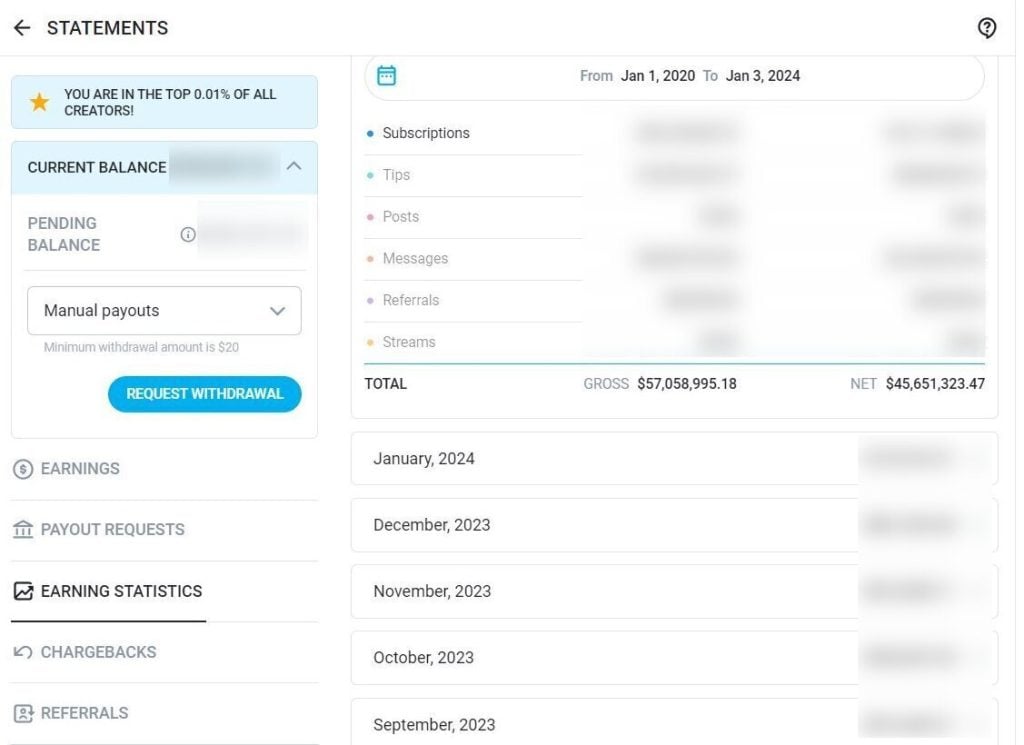
In your account, you can see how much money you’ve earned from subscriptions, tips, posts, and streams
Available withdrawal methods
Bank transfer (Direct Deposit / ACH / SEPA). This method is best suited for content creators in the US and Europe who work with large amounts (from $500).
Funds are transferred directly to your bank account via:
- US — ACH (Automated Clearing House);
- Europe — SEPA (Single Euro Payments Area);
- UK — direct bank transfers;
- Other countries — international wire transfers.
Processing time: 1-3 business days for the US and 5-10 business days for international transfers.
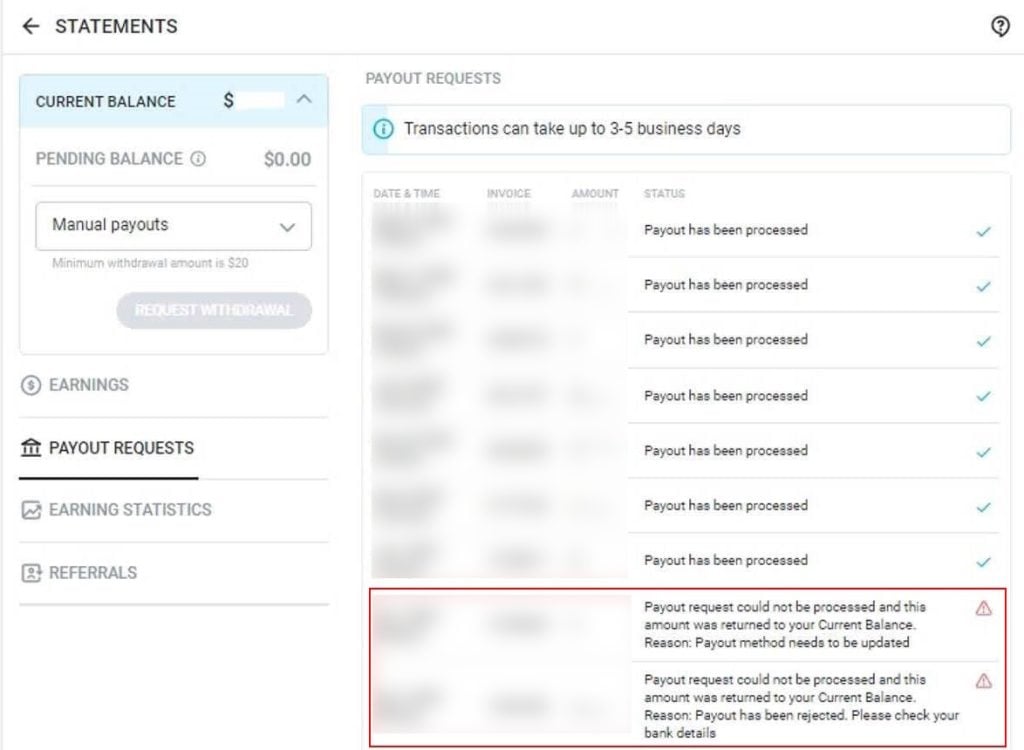
The system will notify you if your payment request could not be processed, for example, due to incorrect bank details
OnlyFans doesn’t charge extra for ACH and SEPA transfers. However, for wire transfers, they charge a fixed fee of $30-$40.
Keep in mind that your bank might also charge a fee for incoming international transfers ($10-30). If your account is not denominated in US dollars, 1-3% of the amount will be used for currency conversion.
The minimum withdrawal amount is $20 for direct deposits and $200-500 for wire transfers (depending on the country, please check with your bank). The main advantage of this method is direct withdrawal to your bank account. For creators in the US and Europe, fees stay relatively low.
However, in some cases, banks may block transfers from OnlyFans due to internal policies against the adult industry. For large transfers (over $10,000), the bank may request additional documents for verification as part of its anti-money laundering program.
Paxum This is an e-wallet designed for adult industry workers. It’s especially relevant for content creators in the CIS, Latin America, and Asia. It works simply: funds are deposited into your Paxum account, then you can withdraw them to your bank card or use the funds directly through the platform.
The service is available in most countries. Transactions are quite fast: a transfer from OnlyFans to Paxum takes 1-2 business days, while subsequent withdrawals to a card or bank account take 3-5 days.
As for fees, the following applies:
- transfers from OnlyFans to Paxum are usually either free or subject to a minimal fee;
- withdrawals from Paxum to a bank card are subject to a fixed fee of $1–5 plus a percentage depending on the region and the selected method (the percentage may vary depending on the transfer amount);
- currency conversion within Paxum costs approximately 2–3% (check the service’s website for current rates and fees);
- account maintenance fees may also apply.
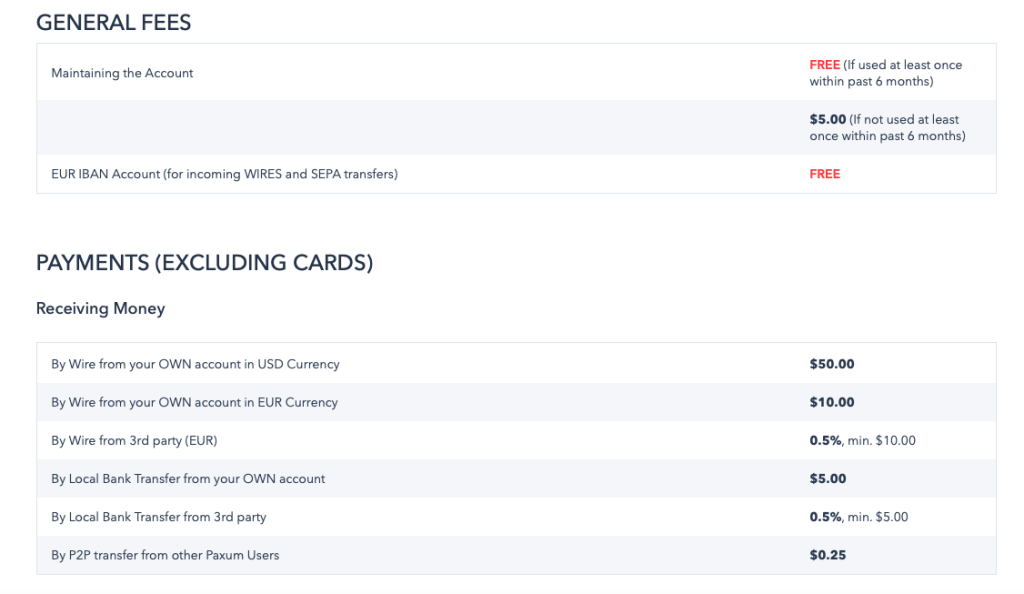
Paxum fees
Paxum’s main advantage is that you can store funds in your balance and withdraw them in installments as needed. And since the service is designed specifically for the adult industry, the risk of being blocked by payment systems is significantly lower than with traditional banks.
However, Paxum does have certain drawbacks. First, there are high fees. Second, getting started requires registering a separate account and going through a verification process, which takes a considerable amount of time.
Revolut, Wise, and other fintech services. You work with a virtual or physical dollar account that functions like a regular bank account. This is an ideal solution for content creators in countries with high banking fees.
OnlyFans typically doesn’t charge an additional fee (it works like a regular bank transfer). Revolut/Wise charge a currency conversion fee of 0.5-2% (check the exact rates on the service’s websites).
The main advantage of these solutions is the favorable conversion rate. Fintech services typically offer currency exchange rates closer to the market rate than traditional banks. You can also open a USD account without being in the US. This is convenient: you don’t need to convert your money every time you withdraw; you can save it in foreign currency and withdraw it when the rate is favorable.
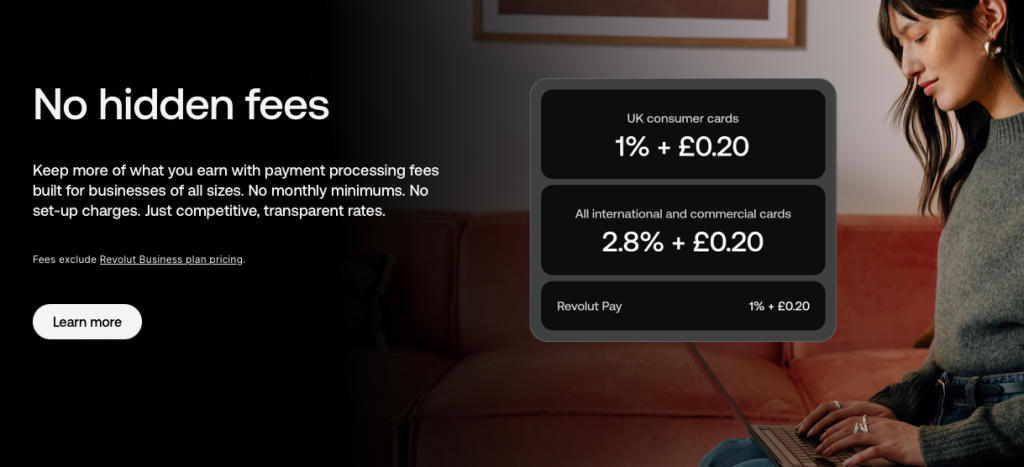
Before registering, check if the service supports transactions with OnlyFans
However, it’s important to note that not all services work with OnlyFans. Some fintech banks block payments from adult content platforms due to their internal policies or regulatory requirements.
In some cases, the service will request documents explaining the source of the funds. This is also worth keeping in mind.
Some services allow withdrawals in cryptocurrency (USDT, BTC, ETH), which will speed up the process, but there are risks associated with exchanging for fiat currency through P2P platforms.
Step-by-step instructions: how to request a payout
Step 1. Check your available balance. Go to the «Banking» section in your account settings. There you will see:
- Pending balance — funds not yet available for withdrawal (less than 7 days have passed since the transaction).
- Current balance — funds available for withdrawal right now.
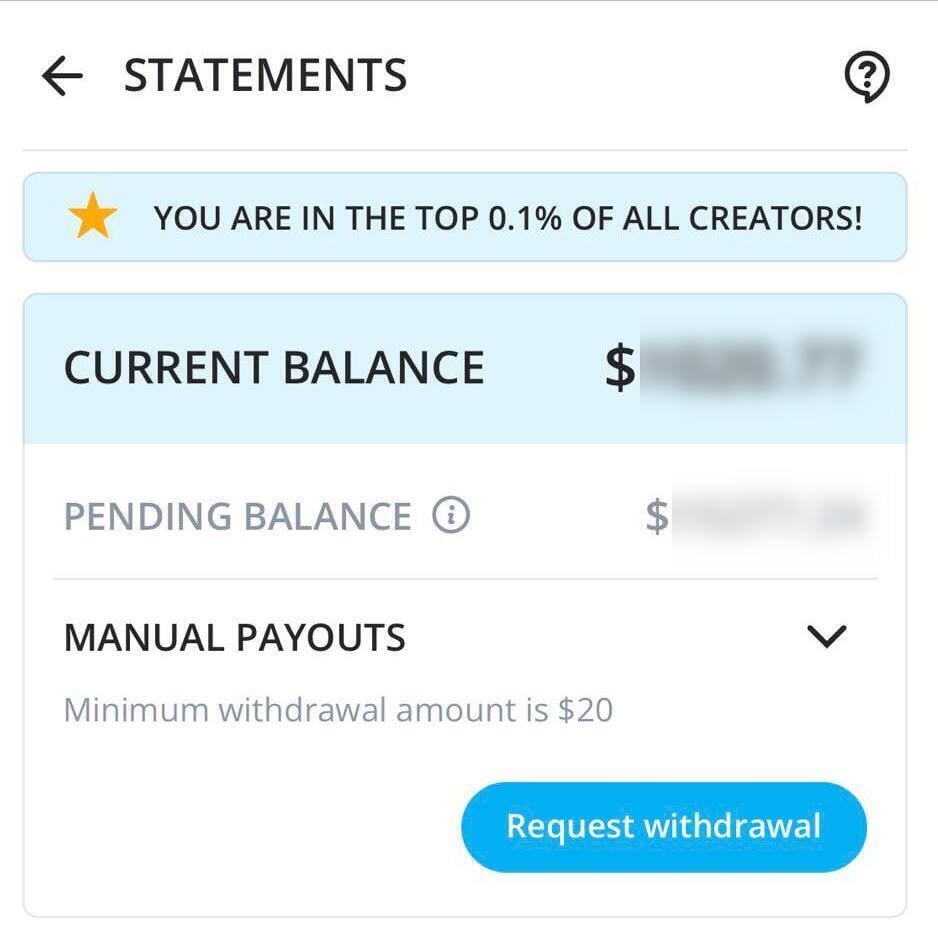
If your current balance is less than the minimum withdrawal amount, you will need to either wait or earn more
Step 2. Set up a withdrawal method. Go to Banking → Add a bank account (or select another available withdrawal method).
For a bank transfer, you will need:
- Bank name (full official name);
- IBAN or account number — depending on the country;
- SWIFT/BIC code — required for international transfers (check with your bank);
- Routing number — US only (for domestic bank transfers);
- Account holder’s full name — must exactly match the name listed in your OnlyFans account (otherwise, the payment may be declined);
- Bank address (sometimes required — check with OnlyFans support).
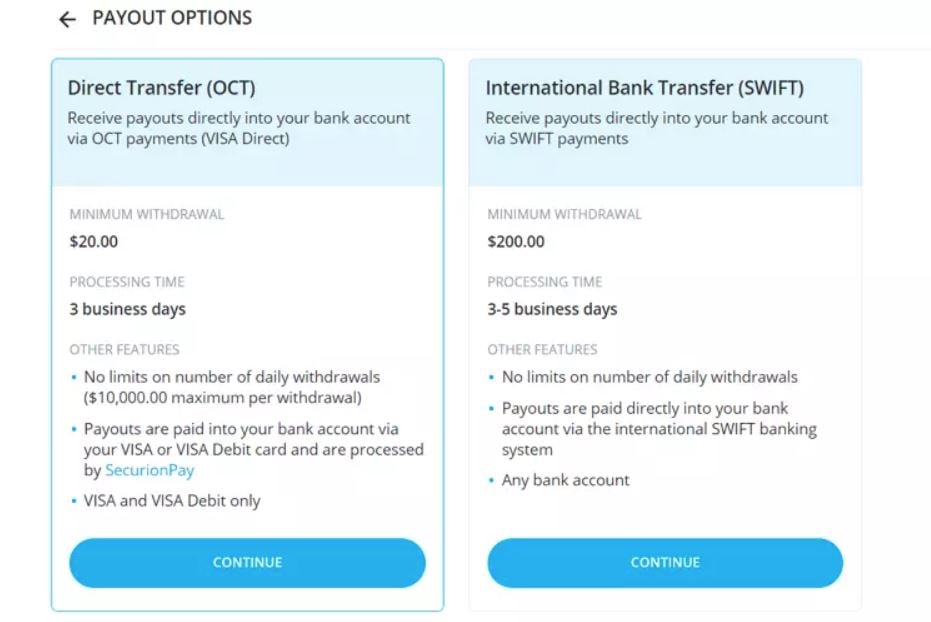
Available withdrawal options from the platform: comparison of minimum amounts and processing times
If the system does not accept the data, check whether the IBAN or SWIFT code is entered correctly; whether the account owner’s name matches the name on the bank account; and whether all required fields are filled in.
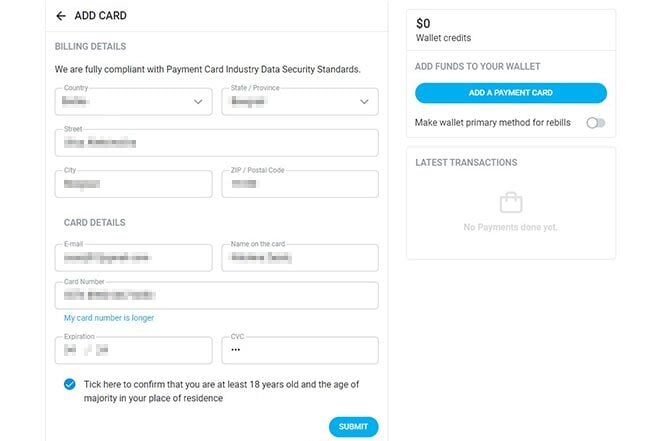
Please fill out the information in English, exactly as it appears on the documents. One typo could delay your payment for weeks or result in your transfer being rejected
For Paxum, you’ll need the email address linked to your Paxum account.
Step 3. Request a withdrawal. In the «Banking» section, click «Request payout». Enter the withdrawal amount (no less than the minimum). Confirm your request. Once confirmed, the funds will be transferred from your current balance to the «processing» status.
Step 4. Wait for processing. OnlyFans will process your request within 1-3 business days, then transfer your funds using your selected method.
Step 5. Check for receipts. Your funds should arrive within the specified timeframe. If they haven’t arrived within 10 business days, please contact OnlyFans support with the transaction details.
Approximate earnings calculation after commission deduction
Let’s say you earned $1,000 on OnlyFans in a month and withdrew it via Paxum to a card in your country, converting it to local currency.
OnlyFans takes 20%: $1,000 – $200 = $800. Withdrawal to Paxum: $800 (usually no commission or minimal). Paxum → card (estimated commission of ~1-2%): $800 – $16 = $784. Currency conversion (estimated exchange rate with commission of ~2-3%): ~97% of $784, or about $760. Then we subtract the tax rate for your country—for example, 6%.
Total: From $1,000 in earnings, you’re left with approximately $700-720 equivalent in local currency. You’ve lost about 28-30% on commissions, conversion, and taxes. For the US and Europe, the picture is better with direct bank transfers: you typically lose 20% (OnlyFans) + 15-30% (taxes) + minimal conversion fees, if needed.
How to minimize losses:
Withdraw large amounts less frequently. Fixed fees (especially for wire transfers) hit smaller withdrawals harder. It’s better to withdraw $1,000 once a month than $250 four times a month.
Use fintech services with good rates. Revolut and Wise typically offer conversion rates 1-2% better than traditional banks. For larger amounts, this makes a significant difference.
Open a dollar account, if possible. Keep your money in USD and convert only when the rate is favorable, not automatically with every withdrawal.
Common payment issues and solutions
Problem 1. Payments are not received or are delayed. Possible causes:
- Error in bank details (typo in IBAN, incorrect SWIFT code);
- The bank blocked an incoming transfer from OnlyFans;
- The payment is being manually reviewed due to suspicious activity;
- Bank holidays or weekends;
- Technical failure on the OnlyFans or bank side.
What to do:
Check the payment status in the “Banking” → “Payout history” section. Possible statuses:
- Processing — the request is being processed
- Sent — the funds have been sent to the bank/payment system
- Completed — the transaction is complete
- Failed — an error has occurred, please check the details
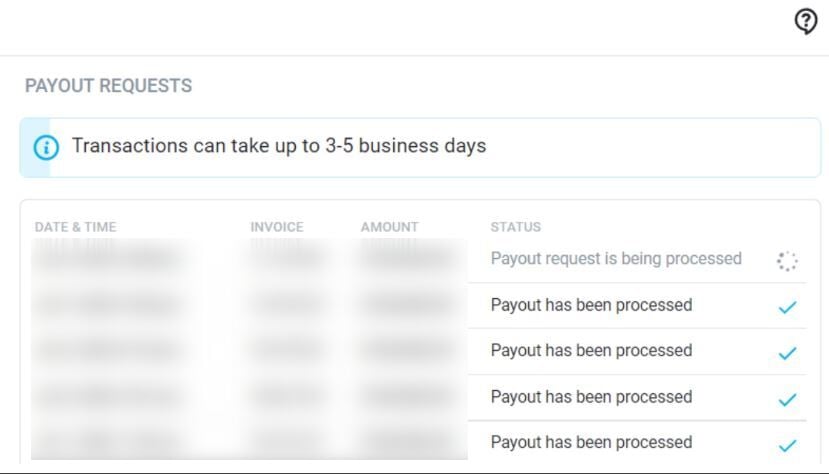
If the status is «Sent» or «Completed», but you haven’t received any money within 10 business days, please contact OnlyFans support with the transaction details
Contact your bank and check if they are blocking incoming transfers from certain senders. Some banks automatically block payments from adult platforms. If your bank is blocking your payments, consider an alternative withdrawal method (Paxum, Revolut).
Problem 2. Account blocked or restricted for payments. Possible reasons:
- Violation of the OnlyFans Terms of Service (prohibited content, subscriber fraud);
- Too many chargebacks (payment refunds from subscribers);
- Suspected fraud (e.g., fake subscribers, cheating);
- Identity or tax verification is incomplete.
What to do:
Check your email—OnlyFans usually sends a notification with the reason for the block or restriction. If verification is incomplete, upload the required documents (passport, selfie with ID). Complete tax forms (W-9 for the US or W-8BEN for other countries). Wait 1-5 days.
If you were blocked for content, remove the content and contact support with an explanation. Promise to comply with the rules in the future. If the block was due to chargebacks, provide proof of the legitimacy of the transactions (message screenshots, proof of content delivery), and explain the situation to support. In the future, be wary of suspicious subscribers.
Important: In serious cases (severe violations, fraud), OnlyFans may permanently delete an account and freeze funds for up to 6 months (the period for potential chargebacks).
Problem 3. The pending balance takes too long to become available. Normal: funds from new transactions become available after 7 days. Abnormal: funds remain pending for more than 10-14 days without explanation. Typical causes include mass subscription purchases from a single IP (which looks suspicious) or a technical glitch in the system.
What to do:
Wait a full 7 days from the transaction date. If the funds are still pending after 14 days, contact OnlyFans support with screenshots and transaction dates. If the reason is a chargeback, wait for the investigation to complete. If you can prove the legitimacy of the funds, the funds will become available.
Problem 4. High fees are eating up too much profit. For example, out of $1,000 earned, you’re receiving less than $650-700. In this case, reconsider your withdrawal method and withdraw less frequently but in larger amounts. Plan your withdrawals: for example, once a month, once you’ve accumulated $500-$1,000.
Taxes: What Models Need to Know
When earning income through OnlyFans, you work as an independent contractor. This means the platform does not automatically withhold taxes (except where expressly required by law); you are responsible for recording your income, expenses, and paying taxes. All payments from OnlyFans (subscriptions, tips, paid messages, donations) are considered official income.
Failure to comply with these obligations can result in serious consequences: fines (up to 40% of the unpaid amount), penalties, account freezes, and, in extreme cases, criminal liability.
You must provide OnlyFans with one of two tax forms, depending on your tax status and country of residence:
- Form W-9 (for US citizens and tax residents);
- Form W-8BEN (for non-US residents).
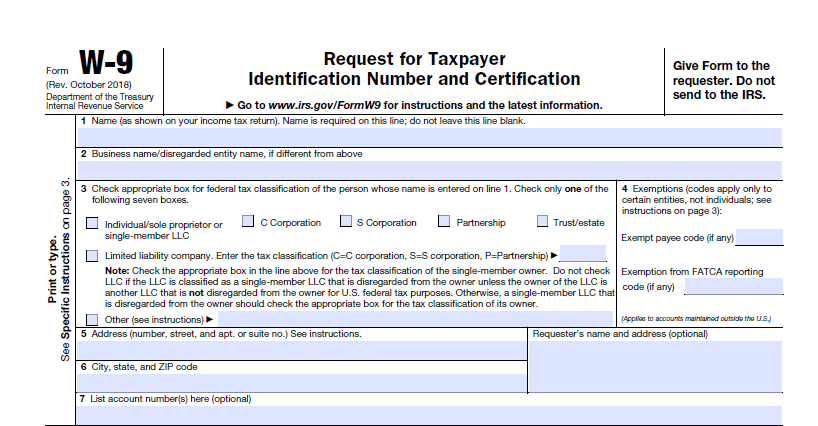
On the W-9 form for OnlyFans, you must provide a Taxpayer Identification Number (TIN). This can be a Social Security Number (SSN) or an Employer Identification Number (EIN)
If you don’t do this, OnlyFans may automatically withhold 30% of your payments as tax. This is a measure required by US law to ensure tax compliance.
The tax system allows you to reduce your taxable income by the amount of eligible business expenses—that is, costs directly related to your business. For OnlyFans, these expenses include:
Technical equipment. Everything you purchase to create content: cameras, lenses, lighting equipment, microphones, tripods, editing computers, external drives. Even expenses on small consumables (memory cards, cables) are tax-deductible.
Software. Licenses for video editors (Adobe Premiere Pro, Final Cut Pro, DaVinci Resolve), subscriptions to stock libraries (music, effects), antivirus software, and security tools. If you use cloud services to store drafts, these costs are also deductible.
Clothing and props for filming. Important: These expenses are only deductible if the items are used exclusively for content. For example, a swimsuit that you only wear on camera can be deducted as an expense. However, if you wear it in everyday life, the tax office will not recognize it as a business expense.
Contractor Services. Makeup artists, stylists, editors, copywriters, and social media marketing specialists. A key requirement is that you must have a contract with the contractor and a certificate of completion, clearly stating the scope of services and cost.
Advertising and Marketing.Costs for targeted advertising, collaborations with other authors, and purchasing promotional space on third-party platforms. Save screenshots of advertising campaigns, indicating the budget and placement period.
Workspace. If you rent a studio, the entire rent is deductible. If you work from home, you can deduct a portion of your utility bills (electricity, internet) proportionate to the space occupied by the filming area. For example, if your apartment is 50 square meters (560 sq. ft.) and 10 square meters (130 sq. ft.) are allocated for filming, you can deduct 20% of your utility bills.
Education and development. Video editing courses, acting training, marketing webinars for content creators, and learning foreign languages—if these directly contribute to improving your product on OnlyFans.
Financial and legal expenses. Bank transfer fees, accountant fees, legal consultations on copyright, and professional insurance (if recorded as a business expense).
What cannot be deducted as expenses:
- personal purchases;
- the full cost of rent;
- food and drinks;
- travel (even if you’re filming while traveling);
- gifts to subscribers without documentary proof that they’re part of an advertising campaign;
- personal transportation expenses (unless you can clearly prove that the car is used exclusively for business trips, such as transporting equipment).
Practical tips:
Keep track of your income and expenses from day one. Create a spreadsheet or use a tracking app (QuickBooks, Wave, even simple Excel). Record all payments from OnlyFans, all business expenses (equipment, clothing, advertising, internet), dates, and amounts. For example: on May 10th, you received a $500 payment—record your income. On May 12th, you purchased $150 worth of props for filming and paid $50 for social media promotion—record these amounts as expenses and save the receipts. This will help you calculate your taxes correctly and avoid overpaying.
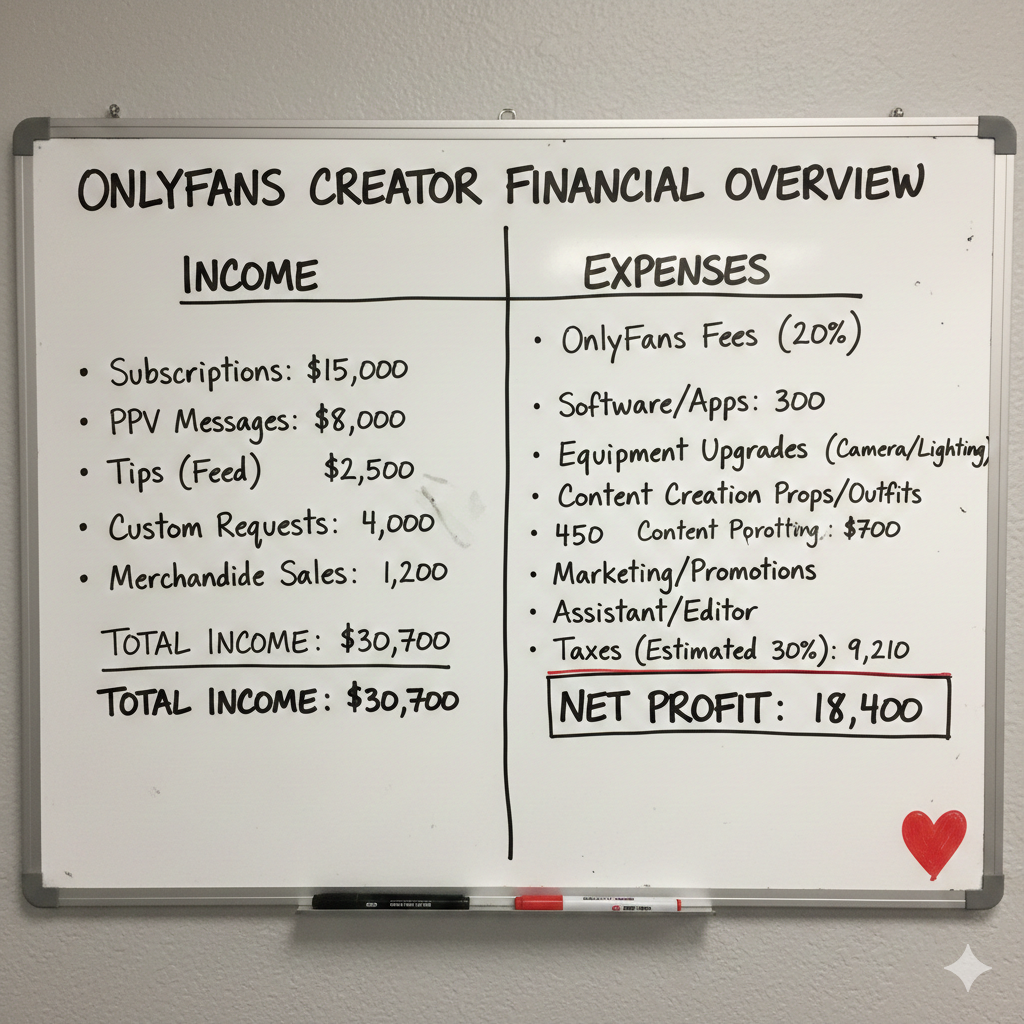
Set aside 20-30% of each payment for taxes. Create a separate account or envelope and don’t touch this money until you file your tax return: if you receive $1,000, immediately set aside $200-$300 for your tax reserve
Consult a tax professional. This is essential if you earn more than $30,000 annually or operate in multiple jurisdictions. The right tax strategy can save you thousands of dollars legally. A tax professional will explain that you can deduct part of your rental housing expenses (if you use it as a studio) or the cost of equipment purchased for filming. This could legally save you between $3,000 and $5,000 per year.
Don’t hide your income. Banks and tax authorities see incoming wire transfers. Attempting to hide your OnlyFans income will result in fines, penalties, and potential criminal liability.
FAQ: Frequently Asked Questions about OnlyFans Payouts
How often can I request payouts?
You can request them daily if your available balance exceeds the minimum amount for your selected method ($20 for direct deposit, $50-100 for e-wallets). There are no limits on the frequency of requests. However, frequent small withdrawals are unprofitable due to fixed fees. Recommendation: withdraw larger amounts once a week or month to minimize your losses.
Can I withdraw money without identity verification?
No. OnlyFans requires identity verification from all creators before the first payout. This is a requirement of financial regulators to combat money laundering and comply with KYC (Know Your Customer).
What is required for verification:
- Passport or driver’s license;
- Selfie holding the document;
- Proof of address (utility bill or bank statement no older than 3 months).
Verification usually takes 1-3 business days.
What should I do if my bank declines a transfer from OnlyFans?
Some banks block transactions from OnlyFans due to internal policies against the adult industry. Contact your bank to find out if such transfers can be unblocked (sometimes it’s enough to prove that the income is legitimate). Open an account with an industry-friendly bank: for example, Chime, Ally Bank, Revolut, N26, or Wise. You can use Paxum as an intermediary: OnlyFans → Paxum → your bank.
Is income from OnlyFans taxable?
Yes, in most countries, income from OnlyFans is taxed as self-employment or business income.
Important: OnlyFans generally does NOT withhold taxes automatically. You must declare your income and pay taxes yourself. The rate varies depending on your country (from 4% to 45%). Be sure to consult a tax professional in your country.
How long will it take to make the first withdrawal?
The first withdrawal will take longer due to additional checks and verification. You need to verify your identity → 1-3 days for document verification, complete tax forms → 1 day, provide your bank details → 1 day for verification, request payment → 1-3 days for processing + 3-7 days for transfer.
Subsequent payments are faster: 7 days pending + 3-7 days for transfer.
Can I receive payments to someone else’s card or account?
No. OnlyFans requires the name on your bank account to exactly match the name on your OnlyFans account (which must match the document). Payments to someone else’s account will be automatically rejected.
This is due to anti-money laundering (AML) regulations and requirements of banking regulators and payment systems. If you use a pseudonym on OnlyFans to communicate with subscribers, your bank details and documents must still contain your real legal name.
What should I do if my payment hasn’t arrived within 10 days?
Check the payment status in the Banking → Payout history. Possible statuses: Processing — OnlyFans is still processing the payment, Sent — sent to the bank/payment system, Completed — completed by OnlyFans, Failed — there was an error, please check the details and try again.
If the status is Sent or Completed but the funds are still missing, contact your bank — the transfer may still be under review. Check if any additional steps are needed on your part.
If the status is Failed, check your bank details (IBAN, SWIFT, name) and request the payment again.
If nothing has resolved the issue after 10 business days, contact OnlyFans support via Settings → Help → Contact Support, attach screenshots of the payment status, indicate the exact date of the request, the amount, and the withdrawal method. Support typically responds within 1-3 days and helps resolve the issue.
Is there a minimum or maximum withdrawal amount?
The minimum amount depends on the withdrawal method: for example, for ACH/SEPA bank transfers it’s $20, while e-wallets require $50-100. If your balance is less than the service’s limit, the withdrawal button will be inactive.
As for the maximum amount, OnlyFans officially doesn’t set an upper limit on a single withdrawal. Technically, you can withdraw up to $100,000 at a time. However, there are practical limitations: banks can automatically block very large transfers (usually $10,000+) for money laundering checks, and tax authorities pay attention to large one-time payments.
If you withdraw more than $10,000, notify your bank in advance or split it into several transactions of $5,000-7,000.
Author

Want more paying OnlyFans subscribers?

Launch a campaign in 24 hours and fill your creators’ pages with real fans, not freebie hunters.
Recent partner average: $4.24 back per $1 spent • 324% ROMI
Real people only. No bots, no spam traffic sources.
ONLY FOR ONLYFANS AGENCIES, MODELS, AND MARKETERS
Want to promote your OnlyFans profile?
Start getting paying subscribers from search. Launch in 48 hours.
Recent partner average: $4.24 back per $1 • 324% ROMI